
Build a sales follow-up workflow that closes more deals
Build a sales follow-up workflow that closes more deals
TL;DR:
- Most sales fail in the silence between touchpoints, not because the product or price is wrong.
- Implementing a structured, multi-channel follow-up workflow transforms inconsistent outreach into a measurable, trust-building process that boosts conversions.
Most deals don’t die because your product is wrong or your price is too high. They die in the silence between touchpoints. 80% of sales require 5+ follow-ups to close, yet only 8% of reps ever get there. That gap is where revenue disappears. A structured follow-up workflow fixes that gap by turning inconsistent outreach into a repeatable, measurable process that keeps prospects moving forward, builds genuine trust, and gives you a real edge over reps who send one email and wait.
Table of Contents
- Why follow-up workflows win more deals
- What you need: Tools and resources for efficient follow-up
- How to build a sales follow-up workflow: Step-by-step
- Refining and troubleshooting your workflow
- The often-overlooked edge: Persistence, not perfection, drives follow-up ROI
- Ready to boost your follow-up workflow? Get Sales Navigator affordably
- Frequently asked questions
Key Takeaways
| Point | Details |
|---|---|
| Multi-touch wins | Following up 5 or more times across channels greatly increases your deal win rate. |
| Timely response | Contacting leads within 5 minutes hugely boosts your chance of a reply. |
| Personalize and persist | Tailored messages and steady persistence outperform generic, sporadic follow-ups. |
| Iterate and improve | A/B test and refine your workflow regularly to keep response and conversion rates high. |
Why follow-up workflows win more deals
One-off follow-ups feel like effort, but they rarely move the needle. The reps who consistently close are the ones who show up multiple times, across multiple channels, with a clear plan behind every touchpoint.
The numbers back this up. Multi-touch follow-up boosts win rates by 34% compared to single-touch outreach. That’s not a marginal gain. That’s the difference between a good quarter and a great one. The reason is straightforward: buyers need time to process, get internal buy-in, and feel confident. A workflow that meets them at each of those moments keeps you top of mind without feeling pushy.
Effective follow-up workflows typically involve 5 to 12 multi-channel touchpoints spread over two to four weeks, mixing emails, calls, and LinkedIn messages. Each channel reaches a different version of your buyer’s attention. Email is great for detailed context. A phone call adds urgency and a human voice. LinkedIn messages feel personal and low pressure. Together, they create a surround-sound effect that a single-channel approach simply can’t replicate.
Here’s what a basic multi-touch sequence looks like in practice:
- Day 1: Personalized email referencing a specific pain point or trigger event
- Day 3: LinkedIn connection request or message with a value-add resource
- Day 5: Follow-up email with a short case study or social proof
- Day 8: Phone call with a clear, specific reason for calling
- Day 12: LinkedIn message checking in and offering a fresh angle
- Day 16: Final email with a low-friction call to action
“The fortune is in the follow-up. Most reps give up right before the prospect was about to say yes.”
Building a prospecting workflow with Sales Navigator makes it easier to identify the right moments to reach out, so each touchpoint feels timely rather than random. Pair that with a consistent LinkedIn-driven engagement strategy and you have a workflow that compounds over time.
What you need: Tools and resources for efficient follow-up
A workflow is only as strong as the tools behind it. Without the right stack, even the best-designed cadence falls apart in execution.
Here’s what every high-performing follow-up workflow needs:
- CRM (Customer Relationship Management) platform: Tracks every interaction, sets reminders, and gives you a clear view of where each prospect stands. HubSpot, Salesforce, and Pipedrive are popular options for B2B teams.
- Email automation: Lets you schedule sequences in advance so follow-ups go out even when you’re focused elsewhere. Automated sequences like HubSpot Sequences or Salesforce Flows handle reminders and task creation automatically, reducing the chance of a lead slipping through the cracks.
- LinkedIn Sales Navigator: Provides real-time alerts on job changes, company news, and buyer activity, giving you natural, relevant reasons to reach out. It’s the difference between a cold message and a timely one.
- Calling and voicemail tools: Platforms like Aircall or JustCall let you log calls directly to your CRM and even drop pre-recorded voicemails to save time.
- Calendar scheduling tools: Calendly or similar tools remove the back-and-forth friction when a prospect is ready to book a meeting.
| Tool type | Manual approach | Automated approach | Best for |
|---|---|---|---|
| Email follow-up | Individual sends, easy to forget | Sequences with triggers | Consistent outreach at scale |
| LinkedIn outreach | Manual messages, time-intensive | Sales Navigator alerts + templates | Timely, personalized contact |
| CRM tracking | Spreadsheets, error-prone | Automated logging and reminders | Full pipeline visibility |
| Call management | Unlogged, hard to review | Integrated dialers with CRM sync | Speed and accountability |
The cost of assembling this stack adds up fast, especially for small teams. That’s where smart decisions about which tools to prioritize matter most. Check out our sales outreach tools checklist for a lean setup that doesn’t break the budget.
Pro Tip: Don’t try to automate everything at once. Start with email sequences and CRM reminders, then layer in LinkedIn Sales Navigator once your core cadence is running smoothly. Adding tools too quickly creates confusion and gaps.
For the best results from LinkedIn specifically, reviewing proven Sales Navigator tips will help you use the platform’s filtering and alert features to their full potential.
How to build a sales follow-up workflow: Step-by-step
With your tools in place, here’s how to build a workflow that actually converts. The key is structure combined with flexibility. You want a repeatable framework, but one that leaves room for personalization based on how each prospect behaves.
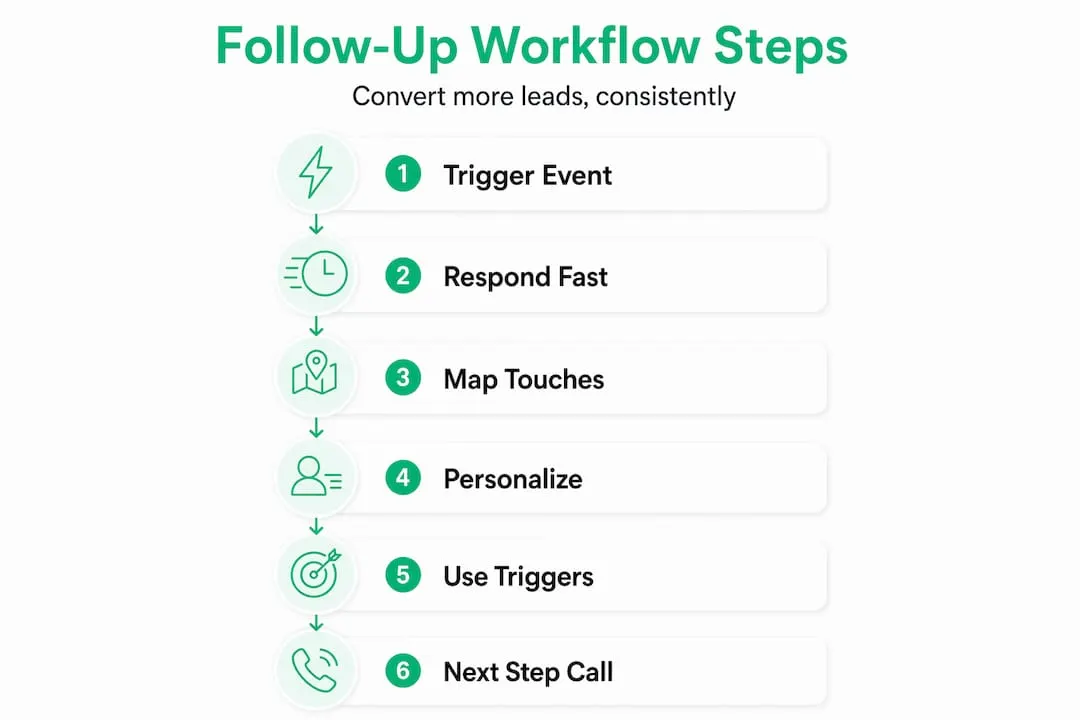
Step 1: Define your trigger event. Every workflow starts with something. A demo request, a content download, a trade show conversation, or a cold outreach response. Know your trigger so your first follow-up is immediate and relevant.
Step 2: Follow up fast. Responding within 5 minutes of an initial inquiry yields 9x to 21x higher response rates. Speed signals professionalism and genuine interest. Set up notifications so you never miss a trigger.

Step 3: Map your touchpoints. Decide how many touches, which channels, and what spacing you’ll use. A typical B2B workflow runs 6 to 8 touches over two weeks. Use the table below as a starting framework.
| Day | Channel | Message focus |
|---|---|---|
| 1 | Personalized intro, reference trigger event | |
| 3 | Connection or value-add message | |
| 5 | Case study or relevant insight | |
| 8 | Phone | Direct check-in, specific reason to call |
| 12 | New angle or resource share | |
| 15 | Soft CTA, low-friction ask | |
| 18 | Phone | Final outreach before break-up |
Step 4: Personalize every message. Generic messages get ignored. Personalized follow-ups increase transaction rates by 6x, and using multiple channels boosts conversion by 27%. Reference the prospect’s company news, a recent LinkedIn post they made, or a challenge specific to their industry. Sales Navigator makes this easy by surfacing relevant activity in real time.
Step 5: Use behavioral triggers. If a prospect opens your email three times but doesn’t reply, that’s a signal. If they click a link to your pricing page, that’s an even stronger one. Build triggers into your workflow so that certain behaviors automatically escalate the follow-up or shift the message focus. Explore multichannel outreach strategies to understand how to coordinate these signals across platforms.
Step 6: Always end with a clear next step. Every message should close with one specific, easy action. “Would Tuesday at 2pm work for a 15-minute call?” is far more effective than “Let me know if you’re interested.” Ambiguity kills momentum.
Pro Tip: Review your engagement tips for LinkedIn to craft LinkedIn messages that feel natural and get replies, rather than coming across as templated outreach.
Refining and troubleshooting your workflow
Building the workflow is step one. Keeping it effective over time is the real work. Most reps set up a cadence and never look at it again. That’s a mistake.
Start by tracking these core metrics every week:
- Response rate by channel: Which touchpoints are generating replies?
- Open rates by day and time: Are your Day 1 and Day 3 emails outperforming later ones?
- Time to first response: How quickly are prospects engaging after the trigger event?
- Conversion rate by workflow stage: Where are prospects dropping off?
- Sales cycle length: Is your workflow shortening the time from first touch to close?
“What gets measured gets managed. A workflow without metrics is just a guess.”
Always end every touchpoint with a clear next step and map your messages to the buyer’s journey. Early touches should educate and build rapport. Middle touches should address objections and build urgency. Late touches should focus on decision-making and logistics. Using behavior triggers like email opens and link clicks to create dynamic cadences means your workflow adapts to the prospect rather than forcing them through a rigid funnel.
Run A/B tests on subject lines, message length, call-to-action phrasing, and send times. Make one change at a time so you know what’s driving the improvement. Refine quarterly based on what the data tells you, not what feels right.
When progress stalls, here are the most common fixes:
- Low open rates: Test new subject lines. Shorter, curiosity-driven subjects often outperform formal ones.
- No replies after multiple touches: Shift channels. If email isn’t working, try LinkedIn or a phone call.
- Prospects going cold: After 8 to 12 touches with no reply, send a break-up email. Something like “I don’t want to keep reaching out if the timing isn’t right. Should I close your file?” often gets a response when nothing else did.
- Long sales cycles: Look at where prospects stall and add a targeted touchpoint that addresses the specific objection at that stage.
For deeper strategies on fixing conversion bottlenecks, the guide on improving sales conversion covers the most common workflow gaps. And if you want to speed things up without adding headcount, automation for smarter prospecting shows you how to do more with less.
The often-overlooked edge: Persistence, not perfection, drives follow-up ROI
Here’s something most sales training gets wrong. Reps spend weeks designing the perfect workflow, obsessing over subject line formulas and optimal send times, then abandon the whole thing after two weeks because results aren’t instant. The irony is that the data consistently rewards persistence over perfection.
Email sequences yield $38 for every $1 spent, and persistent follow-up uncovers 28% of hidden buying signals that would otherwise go unnoticed. Those signals don’t show up on Day 1. They show up on Day 9 when a prospect finally forwards your email to their boss, or on Day 14 when they click your pricing link for the third time.
There’s a real debate in the sales community about follow-up volume. Some argue that 2 to 3 follow-ups is the maximum before you risk annoying a prospect, while others advocate for 8 to 12 touches based on persistence data. Both camps have a point. The answer depends entirely on your industry, your buyer’s decision-making timeline, and how well you personalize each touch. A generic follow-up at touch 3 is more damaging than a highly relevant one at touch 10.
The other trap is letting automation replace relationship-building. AI tools can personalize at scale and flag behavioral signals, but they can’t replace the judgment call of knowing when to slow down and have a real conversation. Use automation to handle the logistics. Use your instincts to handle the relationship.
The reps we see consistently outperform their targets aren’t the ones with the most sophisticated tech stack. They’re the ones who adapt quickly, test honestly, and show up one more time than the competition. Customizing your outreach stack to fit your specific sales cycle matters far more than copying someone else’s “proven” template.
Ready to boost your follow-up workflow? Get Sales Navigator affordably
Putting this workflow into practice is much easier when you have LinkedIn Sales Navigator giving you real-time buyer signals, advanced search filters, and direct InMail access. The challenge for many small teams and individual reps is the cost.
That’s exactly what SalesNavSplit solves. We provide official LinkedIn Sales Navigator licenses at roughly 50% off standard pricing, sourced through verified reseller partnerships in the US and Europe. Every seat is genuine, compliant with LinkedIn’s terms of service, and activated within two business hours European time. No credential sharing, no suspicious workarounds, just legitimate access at a price that makes sense for lean teams. To get the most out of your seat from day one, start with our proven Sales Navigator tips and put this workflow to work immediately.
Frequently asked questions
How many follow-ups are optimal for closing a sale?
Research shows that 6 to 8 touches over two weeks produces 20% higher close rates, making it the most effective range for most B2B sales cycles.
What’s the recommended timing for first sales follow-up?
Following up within 5 minutes of an initial inquiry generates 9x to 21x higher response rates, so speed on that first touch is critical.
Should I personalize every sales follow-up message?
Yes. Personalized messages deliver 6x higher transaction rates than generic ones, making personalization one of the highest-ROI habits in your workflow.
How do I know if my follow-up workflow is working?
Track response rates, open rates, and sales cycle length week over week, and run quarterly A/B tests to identify which changes are actually moving the needle.
What should I do if a lead stops responding after several follow-ups?
If there’s no reply after 8 to 12 touches, send a break-up email to close the loop or redirect your energy toward nurturing existing customers who are more likely to convert.