
Workflow for Activating Sales Tools: A 2026 Guide
Workflow for Activating Sales Tools: A 2026 Guide
TL;DR:
- A structured, staged sales tool activation process connects CRM, outreach, and enrichment tools to improve efficiency and adoption. Proper planning, security protocols, and sequential workflow building ensure consistent integration, high user engagement, and long-term ROI. Neglecting these steps leads to fragmented tech stacks, low adoption, and security vulnerabilities.
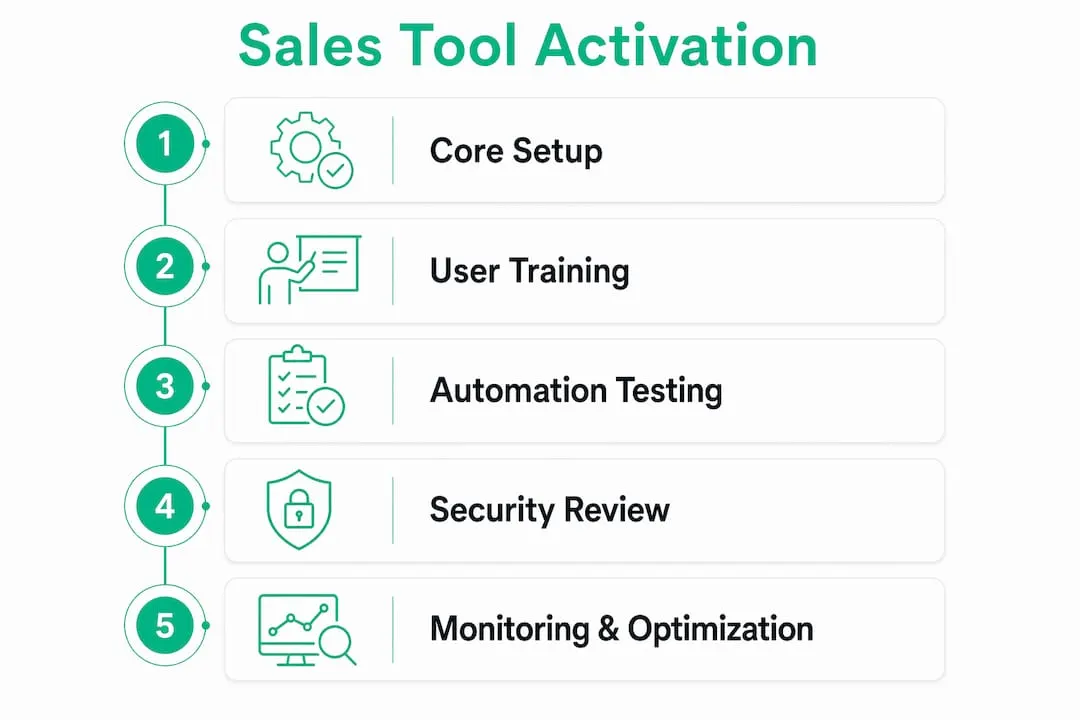
A workflow for activating sales tools is a structured, staged process that connects your CRM, outreach platforms, and enrichment tools into a single operating system for your sales team. Done right, it eliminates manual handoffs, reduces configuration errors, and gets reps selling faster. Done wrong, it creates fragmented tech stacks, security gaps, and tools nobody uses. AI-assisted sales workflow automation saves reps 2 to 3 hours per day on manual tasks, which means a 10-person team gains up to 30 additional selling hours daily without adding headcount. The sales tool activation process is not a one-day event. It is a deliberate sequence that determines whether your investment pays off.
What is the workflow for activating sales tools?
The sales tool activation process is the industry term for what most teams call “tool setup.” It covers everything from data readiness checks to integration configuration, user permissions, testing, and training. Tools like Gangly, SyncGTM, and Outreach each automate pieces of this process, but the sequencing decisions still belong to you. The workflow for activating sales tools has six core phases: readiness assessment, tool selection and prioritization, staged activation, integration testing, training, and ongoing optimization. Each phase depends on the one before it. Skipping readiness checks, for example, causes enrichment tools to populate bad data into your CRM from day one.
What prerequisites do you need before activating sales tools?
Activation fails most often before it starts. Dirty CRM data, undefined ownership, and missing approval structures turn a two-week setup into a two-month fire drill.

Start with a data quality audit. Your CRM is the foundation every other tool writes to and reads from. If contact records are incomplete or duplicated, tools like lead scoring platforms and sequence enrollers will produce unreliable outputs immediately. Check for duplicate records, missing company domains, and stale contact fields before connecting anything.
Build your core tool list before activating anything. The tools that belong in your first activation wave are:
- CRM (Salesforce, HubSpot, or Pipedrive as your system of record)
- Email sync and calendar integration (Google Workspace or Microsoft 365)
- Team communication (Slack with CRM notifications enabled)
- A prospecting tool with LinkedIn data access
Everything else, including conversation intelligence, proposal software, and advanced analytics, belongs in a second wave. Activating too many tools at once is the single most common reason adoption collapses.
Prioritize native integrations over connector bridges. Native integrations maintain context and reduce errors compared to Zapier-style bridges, which introduce latency and break silently when field mappings change. If your CRM does not offer a native connector to a tool you need, that tool belongs in wave two after you have confirmed the core stack is stable.
Set up a permission and approval matrix before any activation. One-click activation features can bypass security, creating shadow agents that mishandle sensitive prospect data. A three-tier approval matrix, covering admin, manager, and rep levels, limits who can activate new tools and connect integrations. This is not optional. Review your security protocols for sales software before granting any broad permissions.
Pro Tip: Start your activation sequence with the two or three tools tied directly to your primary KPI. If your KPI is meetings booked, activate your email sequencer and LinkedIn prospecting tool first. Everything else can wait.
How to implement a step-by-step workflow to activate sales tools
Building a complete set of automated sales workflows takes 2 to 3 weeks without developer support when data quality is solid. That timeline assumes you build in sequence, not all at once.
Here is the activation sequence that works:
-
Days 1 to 3: Activate core tools only. Connect your CRM, email sync, and calendar. Confirm that contact records sync correctly in both directions. Do not add any other tools until this layer is stable.
-
Days 4 to 7: Build lead enrichment workflows. Connect your data enrichment tool (such as Clay or Apollo) to your CRM. Set enrichment to trigger automatically when a new contact is created. Enrichment must run before scoring because scoring models depend on complete firmographic data.
-
Days 8 to 10: Configure lead scoring and routing. Once enrichment is running cleanly, build your scoring model based on ICP fit and intent signals. Set routing rules to assign leads to the correct rep or territory automatically.
-
Days 11 to 12: Build sequence enrollment triggers. Connect your outreach platform (Outreach, Salesloft, or a comparable tool) and configure enrollment triggers based on lead score thresholds or CRM stage changes. Multi-channel outbound workflows book 2.5 times more meetings than email-only sequences, so include LinkedIn touchpoints in your sequence design from the start.
-
Days 13 to 14: Test everything in a sandbox. Test automated workflows with at least 10 sample records in a sandbox environment before going live. Check that each trigger fires correctly, that data flows to the right fields, and that no records fall through without a next step.
-
Day 14: Train on one job-to-be-done. Do not train reps on every feature. Focus training on one KPI-linked task to drive faster adoption. If the goal is pipeline generation, train only on prospecting and sequence enrollment in the first session.
| Activation phase | Key action | Timeline |
|---|---|---|
| Core tool setup | CRM, email sync, calendar connected | Days 1 to 3 |
| Enrichment | Auto-enrich new contacts on creation | Days 4 to 7 |
| Scoring and routing | ICP-based scoring, auto-assignment | Days 8 to 10 |
| Sequence enrollment | Multi-channel triggers from CRM stage | Days 11 to 12 |
| Sandbox testing | 10 sample records, full workflow check | Days 13 to 14 |
Pro Tip: Have each rep complete their own tool setup in the first hours rather than having an admin do it for them. Self-directed setup builds confidence and surfaces real obstacles faster than a guided walkthrough.
How to troubleshoot common problems in sales tool activation
Most activation problems fall into three categories: security gaps from rushed permissions, silent failures in automated triggers, and low adoption from poor training design. Each one is preventable.
Avoid big-bang deployments at all costs. Staging tool activation over two weeks produces better configuration accuracy and higher rep confidence than activating everything on day one. When reps encounter five new tools simultaneously, they default to the ones they already know and ignore the rest.
Watch for silent failures in your automation. A workflow that appears to run can still fail to enrich records, skip routing rules, or drop sequence enrollments without generating an error message. Check your workflow execution logs every week for the first month. Look for records that entered a workflow but never completed it.
Audit your permission structure after every new tool activation. Shadow agents created by indiscriminate activation permissions pose real compliance risks, particularly when tools have access to contact data or email accounts. Every new integration should go through your approval matrix before it touches live data.
Review underperforming tools at the 30-day mark. Tools not used by at least 70% of the team after 30 days should be reviewed for removal. Underutilized tools fragment your tech stack and add administrative overhead without contributing to revenue.
“The most common activation mistake is treating tool setup as a one-time IT task rather than an ongoing sales operations responsibility.”
Pro Tip: Public daily scorecards lift tool adoption by 2.3x compared to weekly private reports. Post a simple dashboard showing which reps are using which tools. Visibility creates accountability without requiring a single conversation.
How to maintain and optimize activated sales tools for sustained ROI
Activation is not the finish line. Tools degrade in usefulness when workflows go stale, training is not reinforced, and nobody owns the stack.
Assign a named tool champion for each core platform. This person is not the admin. They are a peer rep who uses the tool daily and can answer questions in Slack without escalating to IT. Champions reduce the friction that causes reps to abandon tools after the first month.
Monitor weekly usage metrics for every activated tool. The metrics that matter most are:
- Login frequency per rep per week
- Workflow trigger volume versus expected volume
- Sequence enrollment rates relative to lead volume
- CRM field completion rates for enriched records
When usage drops below your baseline, investigate before assuming the tool is the problem. Often the issue is a broken integration, a changed field mapping, or a rep who was never properly trained on a specific workflow.
Run a full workflow audit every 90 days. Update enrichment field mappings when your ICP shifts. Rebuild scoring models when your win rate data changes. Add new sequence steps when you identify channels that are converting. Tools like SyncGTM make it possible to update workflow logic without developer support, which means your RevOps team can iterate quickly based on real performance data.
Connect your sales enablement framework to your tool stack so that training content is tied directly to the workflows reps use every day. When a rep struggles with a specific step, the fix should be a targeted coaching session on that one workflow, not a full retraining.
Key takeaways
A successful sales tool activation process requires staged deployment, sequential workflow building, and ongoing usage monitoring to deliver sustained ROI.
| Point | Details |
|---|---|
| Stage activation over two weeks | Activate core tools first to avoid configuration errors and rep overload. |
| Build workflows in sequence | Enrichment must run before scoring; scoring must run before routing. |
| Test before going live | Run 10 sample records through every automated workflow in a sandbox environment. |
| Train on one KPI-linked task | Focus first training sessions on the single workflow tied to your primary metric. |
| Review tool usage at 30 days | Remove or retrain on any tool used by fewer than 70% of the team. |
Why staged activation changed how I think about sales tool setup
Most sales teams treat tool activation like furniture assembly. They follow the instructions once, declare it done, and move on. That approach produces a tech stack that looks complete on paper and underperforms in practice.
What I have found after working with B2B sales teams is that the teams with the highest tool adoption rates are the ones that treat activation as a sales operations discipline, not a one-time IT project. They stage their rollouts deliberately. They train on outcomes, not features. They kill tools that are not working instead of letting them collect dust and drain budget.
The security piece is the one most teams skip entirely, and it is the one that creates the most expensive problems. Giving every rep admin-level activation permissions to speed up onboarding is a shortcut that creates shadow agents, data leaks, and compliance headaches. A three-tier approval matrix takes one afternoon to set up and prevents months of cleanup.
The other thing I would push back on is the instinct to connect everything through Zapier because it is fast. Fast setup is not the same as reliable setup. Native integrations hold context across your stack in ways that connector bridges simply do not. When a Zapier bridge breaks at 2 AM, no one knows until a rep notices missing data the next morning. Native integrations fail loudly and get fixed faster.
If you are starting from scratch, use the B2B outreach stack checklist to identify which tools belong in your first activation wave. Start small, test thoroughly, and expand only when the core layer is stable.
— Toinon
Start your sales tool activation with LinkedIn Sales Navigator at half the cost
LinkedIn Sales Navigator is one of the first tools that belongs in your prospecting workflow, and it is also one of the most expensive line items in a sales team’s budget. Salesnavsplit provides official Sales Navigator seats at up to 50% off standard LinkedIn pricing, sourced through verified reseller partnerships in the US and Europe. Every seat is genuine, compliant with LinkedIn’s terms of service, and activated within two business hours European time. You get official invoicing through Stripe and full access to Sales Navigator’s prospecting and outreach features from day one. If you are building or expanding your sales tool stack, explore the current discount options before paying full retail price.
FAQ
What is a sales tool activation workflow?
A sales tool activation workflow is a structured sequence of steps that connects, configures, tests, and trains a sales team on new technology. It covers everything from CRM data readiness to integration testing and rep onboarding.
How long does it take to activate a full sales tool stack?
Building a complete set of automated sales workflows takes 2 to 3 weeks without developer support when data quality is good. Staging activation over that period reduces configuration errors and improves adoption rates.
What is the biggest mistake teams make when activating sales tools?
The most common mistake is a big-bang deployment that activates all tools simultaneously. This overwhelms reps, increases configuration errors, and produces lower adoption than a staged two-week rollout.
How do you know if a sales tool is actually being used?
Track login frequency, workflow trigger volume, and CRM field completion rates weekly. Any tool used by fewer than 70% of the team after 30 days should be reviewed for removal or additional training.
How do you prevent security risks during sales tool activation?
Use a three-tier approval matrix that limits activation permissions to admins and managers. One-click or automated activation features can create shadow agents with access to sensitive prospect data, which creates compliance exposure.