
Multi-seat sales licensing: cost benefits for teams
Multi-seat sales licensing: cost benefits for teams
TL;DR:
- Multi-seat licensing provides centralized management and often reduces costs compared to individual subscriptions.
- Active usage tracking and regular reviews prevent wasted seats and ensure optimal license allocation.
- Effective management and flexibility are essential for maximizing ROI in multi-seat licensing models.
Most sales professionals assume buying software for a team means paying per person, every time, with separate logins, invoices, and admin headaches. That assumption costs teams real money. Multi-seat sales licensing flips this model by bundling access for multiple users under one agreement, one billing cycle, and one admin account. The result is simpler management and, when done right, significantly lower cost per user. This article breaks down exactly how multi-seat licensing works, how it compares to other models, when it makes sense for your team, and how to avoid the most common trap: paying for seats nobody uses.
Table of Contents
- Understanding multi-seat sales licensing
- Multi-seat vs. concurrent licensing: What’s the difference?
- When multi-seat sales licensing makes sense (and when it doesn’t)
- Best practices for managing multi-seat licenses
- Why multi-seat sales licensing isn’t always ‘set and forget’
- Access affordable multi-seat licensing for LinkedIn Sales Navigator
- Frequently asked questions
Key Takeaways
| Point | Details |
|---|---|
| Seat-based model | Multi-seat sales licensing assigns access to named individuals for easy management and team scalability. |
| Key comparison | Multi-seat and concurrent licensing work differently—choose based on how your team actually uses sales tools. |
| Cost pitfalls | Unused licenses can turn into wasted spend, so review your seat assignments regularly. |
| Optimization strategy | Managing and re-allocating multi-seat licenses helps maximize your team’s ROI on powerful sales tools. |
Understanding multi-seat sales licensing
Multi-seat sales licensing is simpler than it sounds. At its core, it means one organization purchases multiple access rights (“seats”) to a software platform under a single contract. Each seat is assigned to a named user, and all billing and administration flow through one central account.
According to per-seat license principles, multi-seat sales licensing generally means buying multiple licenses so multiple named users in one organization can access the same sales software features under one billing and admin arrangement. This is different from buying individual subscriptions separately for each team member, where billing is fragmented and management becomes a logistical challenge.
Here is how the model typically works in a B2B sales context:
- Named user assignment: Each seat is tied to a specific person, not a shared login or generic account
- Centralized admin: One administrator controls seat assignments, usage monitoring, and billing
- Unified invoicing: The team receives one invoice for all seats, simplifying accounting
- Consistent feature access: All users on the same plan get identical tools and permissions
- Scalability: Adding or removing seats usually involves a simple admin action rather than starting a new contract from scratch
Understanding the sales seat basics helps you see why this model is popular in B2B sales environments. When your sales reps need consistent, daily access to prospecting tools, having individual logins that are properly managed prevents both security gaps and feature inconsistencies.
“The real power of multi-seat licensing isn’t just saving money. It’s giving your team a unified, controlled environment where everyone has the same tools and nobody falls through the cracks.”
For LinkedIn Sales Navigator specifically, LinkedIn seats explained in detail shows how seat-based access ensures every rep gets full access to premium prospecting, InMail credits, and advanced search, all managed from one account. This consistency matters when your entire team runs outreach campaigns simultaneously.
Multi-seat vs. concurrent licensing: What’s the difference?
Now that you know what multi-seat licensing is, it’s important to understand how it compares to another common model: concurrent licensing.
Seat-based vs. concurrent licensing works like this: seat-based licensing assigns licenses to specific named users, while concurrent licensing limits usage by simultaneous active users rather than named individuals. In plain language, concurrent (also called “floating”) licensing means you buy a pool of access rights, and any user from a larger group can tap into that pool as long as the number of simultaneous users doesn’t exceed the limit.
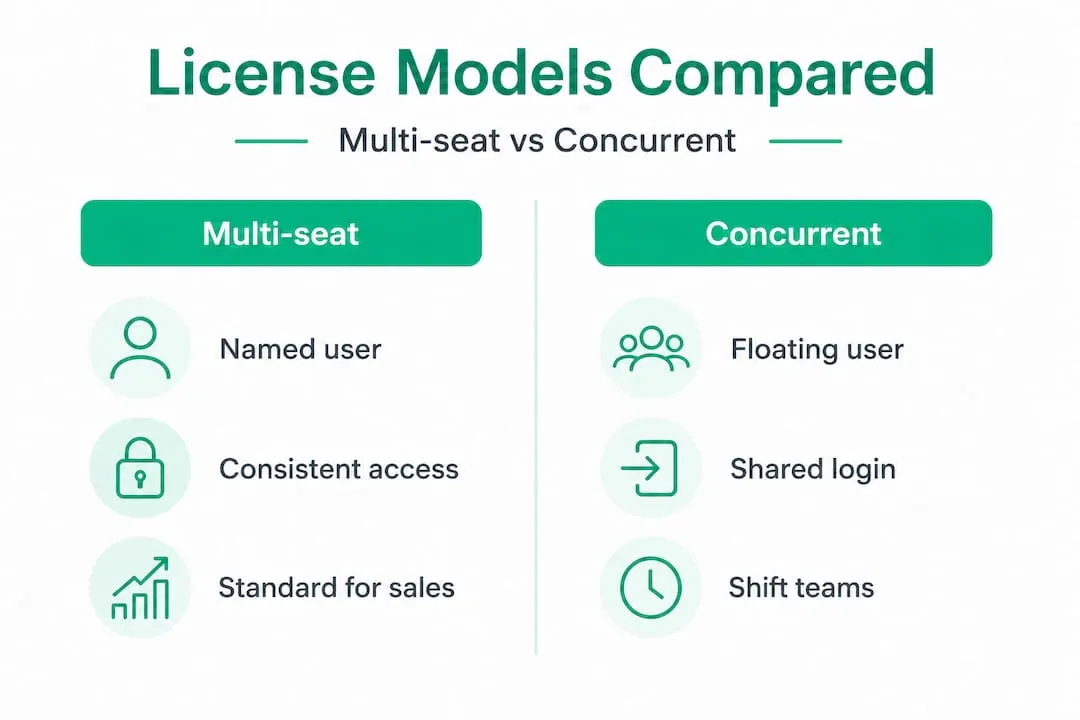
Here is a direct comparison to make this concrete:
| Feature | Multi-seat (named user) | Concurrent (floating) |
|---|---|---|
| Who can access? | Specific named individuals | Any user, up to the active limit |
| Admin complexity | Low, centralized | Moderate, requires usage tracking |
| Best for | Teams with daily, consistent use | Teams with irregular or shift-based use |
| Cost structure | Fixed per named user | Fixed per simultaneous session |
| Security control | High, tied to individual identity | Lower, any eligible user can log in |
| Shelfware risk | Higher if seats go unused | Lower if usage varies across team |
| Sales Navigator compatibility | Yes, standard model | Not typical for LinkedIn tools |
For most B2B sales teams using tools like LinkedIn Sales Navigator, the multi-seat model is the standard because usage is consistent. Reps log in every day to search for prospects, send InMails, and manage lists. Concurrent licensing tends to work better for tools used sporadically, like enterprise reporting software where only a few people need access at a time.
When evaluating Sales Navigator plan options, you will find that LinkedIn operates on a named-user basis, meaning each seat belongs to one person’s profile. This makes multi-seat the only relevant model when you are buying multiple Sales Navigator licenses for a team.
Pro Tip: If your team works in shifts or has seasonal reps who rarely log in simultaneously, concurrent licensing from other tools might save you money. But for a core outbound sales team using LinkedIn daily, multi-seat is almost always the better structural fit.
When multi-seat sales licensing makes sense (and when it doesn’t)
After laying out the main models, let’s look at when multi-seat licensing adds value and when it can backfire.
Multi-seat licensing is genuinely cost-effective when your team uses the software consistently. Think of a 5-person SDR team where every rep runs 20 to 30 LinkedIn searches per day, sends InMails, and saves prospect lists. Each of those reps needs uninterrupted access. Buying 5 named seats under one plan gives them that access with predictable cost and no login conflicts.

Here is a simplified cost scenario showing how seat counts affect total spend at a hypothetical rate of $100 per seat per month at full retail pricing:
| Team size | Full retail cost/month | Discounted cost/month (50% off) | Annual savings |
|---|---|---|---|
| 3 seats | $300 | $150 | $1,800 |
| 5 seats | $500 | $250 | $3,000 |
| 10 seats | $1,000 | $500 | $6,000 |
Comparing your options through a Sales Navigator price comparison makes this real. The savings potential scales directly with team size, which is why finding a legitimate, lower-cost seat source matters more as your team grows.
However, multi-seat licensing can absolutely backfire. The culprit is “shelfware.” As noted in research on per-seat pricing, if you buy seats but not everyone uses them, seat-based agreements can create shelfware, meaning you are paying for access that nobody is actually using. Studies suggest that across enterprise software categories, between 30% and 50% of purchased seats go underutilized at any given time. That is a significant waste.
Here is how to decide if multi-seat is right for your team right now:
- Map actual usage: Ask each potential seat holder how many times per week they realistically log in
- Check your sales cycle: If your team only prospects heavily during specific quarters, audit whether full-year seats make sense
- Review role necessity: Not every sales role needs premium access. Account managers, sales ops, or support reps may not need full Navigator seats
- Track onboarding timelines: New reps often take weeks to start using tools productively, so factor in ramp time before committing to seat counts
- Evaluate team turnover: High-turnover teams lose seat value quickly when seats sit idle during gaps between hires
Building a lean B2B outreach stack means being deliberate about every tool you pay for. Multi-seat licensing is powerful when usage is consistent, but it demands honest usage tracking from the start.
Best practices for managing multi-seat licenses
Knowing the challenges, here is how to make multi-seat sales licensing work for your company rather than against it.
Effective license management is not a one-time setup. It is an ongoing process. Here are the steps that sales leaders should follow to get maximum value from every seat:
- Audit seats before purchasing. Before committing to a seat count, survey your team on actual weekly usage of similar tools. Over-buying is the fastest way to create shelfware from day one.
- Assign seats to your highest-frequency users first. Your most active SDRs and account executives should be the primary seat holders. Part-time or occasional users can often be accommodated through shared strategies or lower-tier tools.
- Set a monthly check-in for login data. Most platforms, including LinkedIn Sales Navigator, show admin-level usage reports. Review these monthly to see which seats are being used and which are dormant.
- Establish a seat rotation policy. If someone leaves the team or transitions to a role that doesn’t require Navigator access, reassign that seat within 48 hours rather than letting it idle.
- Negotiate flexibility into your contract. When signing multi-seat agreements, ask about mid-term seat reductions or upgrade options. Some resellers and vendors allow quarterly seat adjustments, which protects you from being locked into a count that no longer fits.
- Document your admin credentials carefully. Centralized billing means one point of failure if login credentials are lost. Store admin access securely and designate a backup administrator.
- Tie seat assignments to onboarding checklists. New hires should receive their Navigator seat as part of onboarding, not weeks later. Delayed setup leads to productivity gaps.
Advanced prospecting with Navigator tools only delivers ROI if reps are actively using features like saved searches, lead lists, and account alerts. Assigning a seat without training the user to leverage those features wastes just as much value as leaving the seat unused entirely.
Pro Tip: Set a quarterly “license health” meeting where your sales ops or admin reviews seat usage data, identifies dormant accounts, and brings recommendations to reassign or reduce. Treating licenses like any other operational resource, reviewed and optimized regularly, will keep your cost per active user as low as possible.
Multi-seat licensing works best when each user consistently needs access to premium features within sales tools like LinkedIn Sales Navigator, as confirmed by per-seat license research. The keyword there is “consistently.” If your team’s usage is inconsistent, you need to either tighten the process or reconsider the seat count.
Why multi-seat sales licensing isn’t always ‘set and forget’
There is a widely held belief in sales leadership that software licensing is an administrative task. You buy the seats, assign them, and move on. The real work is in selling. This mindset is understandable, but it costs teams thousands of dollars every year.
Multi-seat licensing requires active stewardship. The same flexibility that makes it cost-effective at scale becomes a liability when ignored. When teams grow quickly and new reps get onboarded, additional seats get purchased. Then attrition happens, roles shift, or a product pivot means fewer reps need the tool. Without a structured review process, the seat count never shrinks. It only grows.
This matters even more for SMBs and startups. Larger enterprises can absorb shelfware as a rounding error on a massive software budget. A 10-person sales team cannot. For smaller operations, even two or three unused seats per month adds up to real money across a year.
The deeper issue is that the B2B sales landscape in 2026 moves fast. Teams experiment with new outreach channels, rethink ICP targeting, and restructure their tech stacks regularly. A licensing model that demands commitment to a fixed seat count works against that agility unless you build in deliberate flexibility. The teams that get the most out of multi-seat licensing treat their license count as a living number, not a locked-in decision.
We have seen this play out repeatedly: companies that pair a lean sales stack mindset with regular license audits consistently outperform those that treat software as a “set and forget” line item. The savings compound. The tooling stays tight. And every seat in use is delivering measurable value.
The uncomfortable truth is that the discipline required to manage multi-seat licenses well is the same discipline that makes a sales team effective in the first place: consistent measurement, regular review, and willingness to adapt when the data says something isn’t working.
Access affordable multi-seat licensing for LinkedIn Sales Navigator
For sales teams looking to put these insights into action, here is a simple next step.
Understanding how multi-seat licensing works is only half the equation. The other half is finding seats that are officially licensed, secure, and priced in a way that doesn’t strain a lean sales budget. That is exactly the gap that SalesNavSplit was built to fill.
At SalesNavSplit, you can access affordable Sales Navigator seats at approximately 50% below standard LinkedIn pricing. These are not workarounds or shared credentials. They are genuine, verified LinkedIn Sales Navigator seats sourced through official reseller partnerships in the US and Europe. Seats activate within 24 to 48 hours, billing runs through Stripe with proper invoicing, and every seat is compliant with LinkedIn’s terms of service. Whether you are buying for a single rep or a full SDR team, SalesNavSplit makes it straightforward to get the right number of seats at a price that makes sense.
Frequently asked questions
How is multi-seat sales licensing different from a single-user license?
Multi-seat licensing allows an organization to purchase and manage access for several named users at once under a single billing and admin arrangement, rather than handling individual subscriptions separately. This consolidation reduces administrative overhead and typically lowers the cost per user compared to buying multiple individual licenses.
What is the main risk of multi-seat sales licensing for small teams?
The main risk is paying for unused licenses, commonly called “shelfware,” which occurs when purchased seats are not actively used by team members. Research on per-seat pricing confirms that small teams are especially vulnerable to this waste when usage is irregular or roles shift after seat commitments are made.
Is concurrent licensing better than multi-seat for B2B sales teams?
Concurrent licensing can offer savings when not everyone needs access at the same time, but multi-seat works best when all users need regular, daily access to premium features. Seat-based licensing is the standard model for tools like LinkedIn Sales Navigator because sales reps use these tools consistently throughout the workday.
How often should you review seat usage in your sales team?
You should review seat usage at least every quarter to identify dormant accounts, re-assign unused licenses, and align your seat count with your actual team size and usage patterns. Monthly reviews are even better for fast-growing or high-turnover teams.
Recommended
- LinkedIn Seats Explained: Access, Cost, and Team Benefits - SalesNavSplit Blog
- What is a sales seat? Guide to Sales Navigator access - SalesNavSplit Blog
- Sales Navigator Plans: Choosing the Right Option for B2B Teams - SalesNavSplit Blog
- LinkedIn Sales Navigator Seats - Up to 50% Off | Official Licenses