
Advanced sales search: Smarter B2B prospecting with Navigator
Advanced sales search: Smarter B2B prospecting with Navigator
TL;DR:
- Advanced sales search uses layered filters and Boolean logic for precise prospect targeting.
- Using Navigator significantly boosts win rates and pipeline growth, with a payback under six months.
- Cost-effective access through verified resellers and sharing tools makes Navigator affordable for small teams.
Most sales reps assume their basic LinkedIn search is good enough. It isn’t. The gap between a standard LinkedIn query and what LinkedIn Sales Navigator’s advanced sales search delivers is enormous, and the numbers prove it. Users see 17% higher win rates and 38% pipeline growth compared to teams relying on free tools. This guide breaks down what advanced sales search actually means, which features move the needle, how to measure real ROI, and how smaller B2B teams can access Navigator without paying full retail price. If prospecting feels like guesswork right now, that changes here.
Table of Contents
- Defining advanced sales search
- Core benefits for sales teams
- Key features and real-world application
- Cost-effective access and sharing strategies
- Our take: Rethinking sales search strategy for B2B growth
- Get more from LinkedIn Sales Navigator
- Frequently asked questions
Key Takeaways
| Point | Details |
|---|---|
| Advanced search increases wins | Using LinkedIn Sales Navigator’s advanced search filters boosts deal success rates and pipeline growth compared to basic search. |
| Efficiency and ROI | Navigator users save time weekly and gain up to 312% ROI with smarter prospecting. |
| Affordable access options | Teams can cut costs by buying official seats through a verified reseller, making advanced sales search attainable for small businesses. |
| Practical feature integration | Leveraging lead lists, CRM sync, and targeted filters helps sales teams find and engage prospects more effectively. |
Defining advanced sales search
With the foundation set, let’s clarify what advanced sales search actually involves and how it surpasses simple LinkedIn queries.
At its core, advanced sales search is the ability to filter, segment, and track potential buyers using layered criteria that go far beyond what a standard LinkedIn account allows. Basic LinkedIn search gives you a name field, a keyword box, and a handful of broad filters. That’s it. Advanced sales search, the kind built into LinkedIn Sales Navigator, layers dozens of precise filters on top of each other so you can zero in on exactly the right person at exactly the right company.
Think about what that means in practice. Instead of searching “VP of Sales” and scrolling through thousands of irrelevant profiles, you can filter by seniority level, company headcount, industry vertical, geographic region, years in role, and even recent job changes. You can combine these filters with Boolean logic, meaning you can write search strings like “VP OR Director” AND “SaaS” NOT “self-employed” to get surgical results. The advanced search capabilities available in Navigator are simply not replicable with free tools.
Here are the core filter categories that make advanced sales search powerful:
- Seniority level: Target decision-makers, not gatekeepers
- Company size and headcount: Match prospects to your ideal customer profile
- Industry and sub-industry: Avoid wasted outreach to irrelevant verticals
- Geography: Focus on territories your team actually covers
- Function and department: Reach the right team within a company
- Years in role: Identify buyers who are new and actively evaluating vendors
- Recent activity signals: Engage prospects showing buying intent
Beyond filters, Navigator lets you build saved lead lists, set up alerts for job changes or company news, and sync everything directly to your CRM. That last piece matters more than most teams realize. When your lead data flows automatically into Salesforce or HubSpot, your reps stop doing manual data entry and start selling.
“Advanced sales search is not a feature upgrade. It is a fundamentally different way of identifying and engaging buyers.”
As our Sales Navigator B2B guide explains, the platform is built for modern B2B prospecting where relevance and timing are everything. Navigator’s advanced filtering saves professionals 1.5 hours per week in research alone. Over a full year, that’s nearly two full work weeks returned to active selling.
Core benefits for sales teams
Having defined advanced sales search, it’s critical to see why these functions matter for your team.
Efficiency is the first win, but it’s not the most important one. The bigger story is what happens to your pipeline and your revenue when your reps are spending time on the right prospects instead of the wrong ones.

Sales Navigator delivers 312% ROI over 3 years, and 59% of company revenue at Navigator-using organizations traces back directly to Navigator-influenced activities. Those are not vanity metrics. That’s the difference between a tool that costs money and a tool that makes money.
Here’s a snapshot of what the Navigator performance data shows for B2B sales teams:
| Metric | Without Navigator | With Navigator |
|---|---|---|
| Win rate | Baseline | +17% higher |
| Pipeline growth | Baseline | +38% increase |
| Research time saved | 0 hours | 1.5 hours/week |
| ROI over 3 years | Varies | 312% |
| Payback period | N/A | Under 6 months |
For small and mid-sized B2B teams, these numbers are especially meaningful. Large enterprise sales orgs have armies of SDRs to compensate for inefficiency. You don’t. Every hour a rep wastes on bad leads is an hour not spent closing.
The practical benefits break down into three categories:
- Faster lead identification: Filters surface qualified prospects in minutes, not hours
- Better targeting: Precise criteria mean fewer unqualified conversations
- Higher engagement rates: Reaching the right person at the right time improves response rates significantly
Our prospecting workflow tips show how teams structure their daily Navigator use to maximize these gains. The key is building a repeatable system, not just logging in occasionally.
Pro Tip: Don’t treat Navigator as a search engine you visit once. Set up saved searches with alerts so Navigator notifies you when new prospects match your criteria. This turns prospecting from a weekly task into a daily, low-effort habit.
For teams exploring how Navigator fits into broader B2B sales solutions, the ROI case is straightforward. The tool pays for itself quickly, especially when accessed at a reduced cost.
Key features and real-world application
Now that we’ve explored the benefits, let’s examine which features deliver those results and how to integrate them into daily sales routines.
LinkedIn Sales Navigator has a lot of features, but a handful of them do most of the heavy lifting for B2B sales teams. Knowing which ones to prioritize saves you the learning curve.
Lead and account search filters are the engine. You build searches using the layered criteria described earlier, then save those searches so Navigator automatically surfaces new matches. This is where users report saving significant time and achieving higher engagement rates compared to manual prospecting.
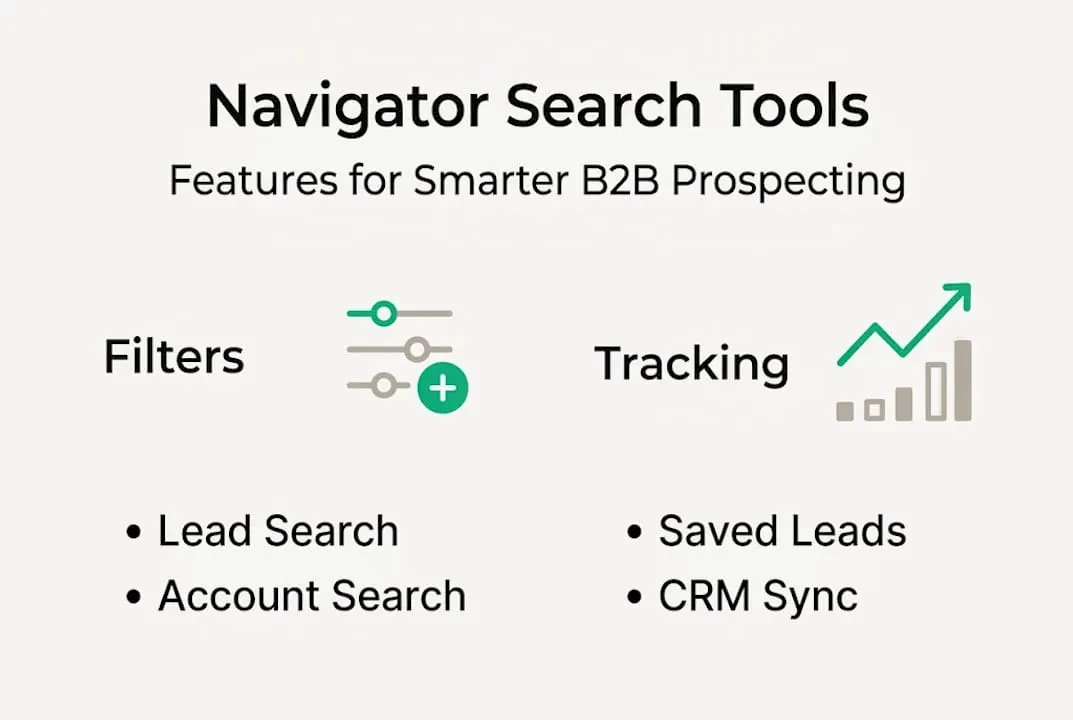
Saved leads and account tracking let you monitor a list of target prospects over time. When someone in your saved list changes jobs, gets promoted, or posts content, Navigator flags it. That signal is your opening for a timely, relevant outreach message.
CRM sync connects Navigator to Salesforce, HubSpot, or other platforms so lead data moves automatically. No copy-paste. No outdated records. Your pipeline stays clean without extra admin work.
Lead recommendations use LinkedIn’s algorithm to suggest prospects similar to your saved leads. It’s like having an AI assistant that learns your ideal customer profile and keeps finding more people who match it.
Here’s how these features compare across Navigator tiers:
| Feature | Core | Advanced | Advanced Plus |
|---|---|---|---|
| Advanced filters | Yes | Yes | Yes |
| Saved lead lists | 1,500 | 5,000 | 10,000 |
| CRM integration | Limited | Full | Full + Auto-save |
| Lead recommendations | Yes | Yes | Yes |
| TeamLink connections | No | Yes | Yes |
A practical workflow for applying these tools looks like this:
- Build a saved search using your ideal customer profile criteria
- Set up alerts for new matches and job changes
- Add qualified prospects to a lead list organized by deal stage
- Use lead recommendations to expand your target pool
- Sync confirmed leads to your CRM for follow-up sequencing
Before reaching out, make sure your own profile is optimized. A strong LinkedIn profile optimization strategy ensures prospects see a credible, professional presence when they check who’s messaging them.
Pro Tip: Use Navigator’s “Spotlights” filter to find prospects who have posted on LinkedIn in the last 30 days. Active posters are more likely to respond to outreach. Pair this with our sales engagement tips to craft messages that actually get replies.
For teams focused on converting those conversations into closed deals, the conversion improvement guide walks through the follow-up process step by step.
Cost-effective access and sharing strategies
Even with powerful features, many teams face budget hurdles. Here’s how to access Navigator without breaking the bank.
LinkedIn’s standard pricing for Sales Navigator can feel steep, especially for small teams or individual reps who can’t justify a full enterprise contract. But there are legitimate, compliant ways to reduce that cost significantly.
Navigator delivers payback in under 6 months when accessed cost-effectively. The key phrase is “cost-effectively.” Paying full retail when alternatives exist is simply leaving money on the table.
Here are the main strategies B2B teams use to reduce Navigator costs:
- Verified reseller seats: Licensed resellers in the US and Europe offer genuine Navigator seats at significant discounts, often around 50% off retail pricing
- Verified reseller licences: An official seat sourced through a reseller costs $50 a month instead of LinkedIn’s $119.99, on your own account
- Annual vs. monthly billing: Committing to annual billing through any channel typically reduces per-seat costs
The reseller route is worth understanding in detail. Our guide on saving with LinkedIn resellers explains how verified partnerships work and what to look for to ensure compliance. The short version: legitimate resellers provide official invoicing, genuine licenses, and no credential sharing that could flag your account.
An official Sales Navigator licence at $50 a month is another practical option. Each person gets their own official seat on their own account, so no login credentials are ever passed between users, which is the risky behavior LinkedIn actually penalizes.
For context on how SaaS team advantages apply here, cost-efficient tool access is one of the clearest competitive edges smaller teams can build.
Pro Tip: Always verify that any reseller or sharing method provides official invoicing and uses LinkedIn-compliant access methods. If a deal looks too good to be true or requires sharing your actual LinkedIn password, walk away. Protecting your account matters more than saving a few dollars.
Our take: Rethinking sales search strategy for B2B growth
With practical strategies outlined, let’s step back and consider where most teams go wrong and what actually works.
Most B2B sales teams underuse Navigator by treating it like a fancier version of basic LinkedIn search. They log in, run a quick filter, grab some names, and move on. That’s not advanced sales search. That’s basic search with a premium label.
The teams that see real results build systems around Navigator. They use saved searches, lead alerts, and CRM sync as a connected workflow, not isolated features. They also stop thinking about Navigator as a solo tool and start treating it as shared infrastructure.
This is where license sharing changes the math entirely. When a small team accesses Navigator at 50% of retail cost through a verified reseller, the ROI calculation shifts dramatically. The payback period shrinks. The per-rep cost drops to a level that’s easy to justify even in a tight budget cycle.
We’ve seen this pattern repeatedly in small business sales insights. The teams that grow their pipeline fastest are not the ones with the biggest budgets. They’re the ones who access the right tools efficiently and build repeatable prospecting habits around them. That combination, smart access plus disciplined use, is what separates teams that hit quota from teams that don’t.
Get more from LinkedIn Sales Navigator
If you’re ready to transform your sales team’s results and efficiency, here’s how to start cost-effectively.
Accessing LinkedIn Sales Navigator at full retail price is optional. At salesnavsplit.com, we provide authorized Navigator seats at approximately 50% off standard pricing through verified reseller partnerships in the US and Europe. Every seat is genuine, compliant with LinkedIn’s terms, and activated within two business hours European time. You get official invoicing through Stripe and a secure setup process that never requires sharing your LinkedIn credentials.
Whether you want a discounted Navigator seat for yourself or one for each person on your team, the process is straightforward. Sign up with Google, choose your plan, and start running advanced sales searches the same week. Your pipeline doesn’t have to wait for budget approval.
Frequently asked questions
How does advanced sales search differ from basic LinkedIn search?
Advanced sales search offers layered filters, Boolean logic, lead recommendations, and CRM integration for precise B2B prospecting. Basic LinkedIn search provides only a few broad filters and no lead tracking. LinkedIn’s advanced filtering saves professionals significant time and increases engagement rates compared to free tools.
Can small teams share LinkedIn Sales Navigator seats legally?
Yes. The compliant option is a verified reseller seat granted to each person’s own account, which never requires passing login credentials. Teams must avoid direct credential sharing, which violates LinkedIn’s terms. Navigator’s payback period drops to under 6 months when accessed through cost-effective, compliant channels.
What ROI can sales teams expect from Sales Navigator?
Sales Navigator delivers 312% ROI over 3 years, along with 17% higher win rates for users compared to teams without it. Results vary by team size and usage discipline, but the payback period is typically under 6 months.
What features make Navigator’s advanced sales search effective?
Navigator’s layered filters, saved lead lists, CRM sync, and AI-driven lead recommendations work together to target the right prospects efficiently. Users see 38% pipeline growth and save 1.5 hours per week in research, making it one of the highest-impact tools in a B2B sales stack.
Recommended
- Streamline your sales prospecting workflow with Sales Navigator - SalesNavSplit Blog
- What is LinkedIn Sales Navigator? B2B prospecting guide - SalesNavSplit Blog
- LinkedIn Sales Navigator Seats - Up to 50% Off | Official Licenses
- Blog - SalesNavSplit
- Lead Generation Process Guide for Enterprise WordPress Success - 40Q