
Small business sales solutions for smarter B2B growth
Small business sales solutions for smarter B2B growth
TL;DR:
- Small businesses face high costs, complex onboarding, and unclear ROI with traditional enterprise sales tools.
- Platform features like flexible pricing, easy setup, and CRM integration make tools like LinkedIn Sales Navigator ideal.
- Effective prospecting depends on strategic, personalized outreach rather than volume or generic messaging.
Most small business owners assume that powerful B2B sales tools are built for enterprise teams with six-figure budgets. That assumption is costing you deals. The reality is that platforms like LinkedIn Sales Navigator are more accessible than ever, especially when you know how to license them smartly. This article breaks down the real barriers small businesses face, explains what makes a sales solution actually worth adopting, and shows you concrete steps to prospect better without draining your budget. Whether you run a consulting firm, a legal practice, or a small tech shop, there is a smarter path forward.
Table of Contents
- Why small businesses struggle with traditional sales solutions
- What makes a sales solution ‘small business-friendly’?
- How LinkedIn Sales Navigator can transform small business prospecting
- Affordable ways to access and optimize LinkedIn Sales Navigator
- The overlooked reality: It’s not the tool, it’s the strategy
- Try smarter sales solutions for your small business
- Frequently asked questions
Key Takeaways
| Point | Details |
|---|---|
| Small business challenges | Traditional sales tools are often too expensive and complex for B2B small firms. |
| Best-fit solution traits | Look for affordability, flexibility, and easy integration with existing workflows. |
| Navigator value | LinkedIn Sales Navigator empowers smarter prospecting and engagement. |
| Cost-saving strategies | An official licence through a verified reseller cuts Sales Navigator costs by more than half. |
| Strategy drives results | Effective use, not just tool access, is the key to small business sales success. |
Why small businesses struggle with traditional sales solutions
The sales technology market was built around enterprise buyers. Big CRM platforms, outbound automation suites, and lead intelligence tools were priced and designed for teams of 50 or more. Small businesses got the leftovers: watered-down free tiers or full-price plans they could not justify.
Three core challenges come up again and again when small B2B firms try to adopt traditional sales platforms:
- Prohibitive costs: Most enterprise sales tools charge per seat, per month, with annual contracts. For a team of two or three reps, the math rarely works.
- Steep learning curves: Platforms built for large organizations come with complex onboarding, dedicated admin portals, and training programs that assume a full-time sales ops person.
- Unclear ROI: Without a large pipeline or dedicated analytics team, it is hard to measure whether the tool is actually moving the needle.
Professional service firms, including legal, financial advisory, and B2B consulting companies, feel this especially hard. Their sales cycles are long, their prospect lists are narrow, and they need precision over volume. Paying for a bloated platform that spits out thousands of irrelevant leads does not serve them.
“Many small businesses find traditional enterprise sales platforms too expensive and complex for their needs.”
The adoption gap is real. Many small firms end up relying on manual LinkedIn searches, spreadsheet-based tracking, and inconsistent outreach. They lose time, miss follow-ups, and watch larger competitors close deals faster simply because those competitors have better tooling.
This is also why outsourced sales strategies have grown in popularity among small firms. When internal tooling is too expensive, some businesses outsource the function entirely. But that creates its own dependencies and costs.
The better path is finding tools that were designed, or can be accessed, at a scale that fits your reality. That starts with understanding what “small business-friendly” actually means in practice. For more on improving your outreach approach, explore these sales engagement tips that apply directly to small team environments.
What makes a sales solution ‘small business-friendly’?
Not every affordable tool is actually useful, and not every expensive tool is actually worth avoiding. The question is whether a platform fits how small B2B teams actually work.
Here is a side-by-side look at what separates small-business-oriented platforms from enterprise-first solutions:
| Feature | Small business solution | Enterprise platform |
|---|---|---|
| Pricing model | Flexible, per seat or shared | Annual contract, volume-based |
| Onboarding | Self-serve, fast setup | Dedicated onboarding team |
| Integrations | Common CRMs (HubSpot, Pipedrive) | Custom API, complex setup |
| Support | Chat or email, responsive | Account manager, SLA-driven |
| Scalability | Grows with your team | Built for large teams from day one |
When evaluating any sales tool, small businesses should prioritize these must-haves:
- Budget predictability: You need to know exactly what you will pay each month, with no surprise overages.
- Ease of integration: The tool should connect to whatever CRM or outreach platform you already use.
- Focused feature sets: You do not need 200 features. You need the 10 that actually move deals forward.
- Flexible licensing: The ability to share seats or scale up and down without penalty is critical for lean teams.
LinkedIn Sales Navigator offers advanced targeting, and an official licence through a verified reseller costs $50 a month instead of $119.99. This changes the cost equation significantly.

Seat sharing, where multiple users access a single licensed seat through a managed tool, is one of the most underrated cost-saving strategies in B2B sales. It is not a workaround. When done through verified platforms, it is a legitimate way to extend your investment.
Pro Tip: When choosing a sales tool, ask yourself if it will still make sense when your team doubles. A tool that works for two reps but breaks at five is not a long-term solution. Look for platforms that offer tiered pricing or seat flexibility from the start.
For a broader look at what to consider before adopting sales solutions, the SalesNavSplit blog covers practical guidance built specifically for small and mid-size B2B teams. And if you want to understand how to turn your tool investment into actual revenue, lead conversion strategies offer a useful framework for connecting prospecting activity to closed deals.
How LinkedIn Sales Navigator can transform small business prospecting
Sales Navigator is not just a fancier LinkedIn search bar. It is a dedicated prospecting engine with features that, when used correctly, give small teams a serious edge.
The core features worth knowing:
- Advanced search filters: Filter by company size, seniority level, geography, industry, and even recent job changes. This precision matters when your prospect list is small and every outreach counts.
- Lead recommendations: Navigator surfaces prospects you might not have found manually, based on your saved leads and search history.
- CRM sync: Connect directly to HubSpot, Salesforce, or Pipedrive to keep your pipeline updated without manual data entry.
- InMail credits: Reach prospects outside your network with direct messages that bypass the connection request step.
Here is a step-by-step example of setting up a targeted sales campaign for a small B2B consulting firm:
- Define your ideal customer profile: company size between 20 and 200 employees, industry in professional services, decision-maker title of VP or Director.
- Use advanced filters in Sales Navigator to build a lead list of 50 to 100 targeted contacts.
- Save those leads to a list and enable alerts for job changes or company news.
- Write three personalized InMail templates based on the specific pain points of each segment.
- Send outreach in batches of 10 to 15 per week, track replies, and refine your messaging based on response rates.
- Sync engaged leads to your CRM and set follow-up tasks automatically.
Businesses using Sales Navigator often see higher conversion and engagement rates compared to manual LinkedIn outreach.
For small service firms, this kind of structured outreach replaces the scattered, inconsistent approach most teams default to. You can boost LinkedIn results significantly just by moving from random connection requests to a system like this.
If you are also thinking about how to expand sales reach beyond your current market, combining Sales Navigator’s targeting with a broader geographic strategy can open up entirely new pipelines.
Affordable ways to access and optimize LinkedIn Sales Navigator
The standard retail price for LinkedIn Sales Navigator can run over $100 per user per month. For a solo rep or a two-person sales team, that adds up fast. But there are legitimate ways to reduce that cost without sacrificing access or compliance.
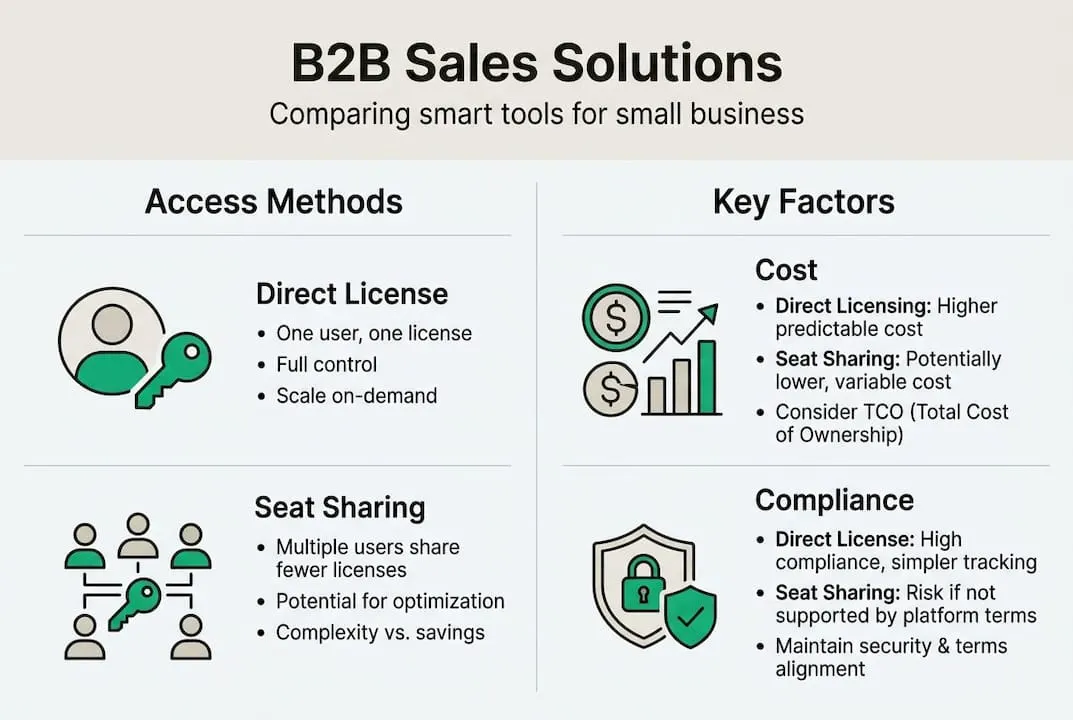
Here is a cost comparison between direct licensing and seat sharing:
| Access method | Monthly cost per user | Annual cost (2 users) | Compliance |
|---|---|---|---|
| Direct LinkedIn license | ~$99 per user | ~$2,376 | Full |
| Verified seat sharing | ~$49 per user | ~$1,176 | Full (if licensed) |
| Unverified third-party | Variable | Variable | Risk |
The savings through verified seat sharing are significant. Seat sharing solutions can lower the effective cost per user by up to 50%, which for a small team translates to real money back in your budget every month.
Strategies for maximizing your Sales Navigator investment:
- Set user limits: Decide upfront who actually needs full access versus occasional use. Not every team member needs daily Navigator access.
- Automate prospect lists: Use saved searches and lead alerts to keep your pipeline fresh without manual effort each week.
- Use the Chrome extension: Tools like the Chrome sharing tool from SalesNavSplit let your team share a seat securely without compromising account integrity.
- Review your saved leads monthly: Prune inactive prospects and replace them with fresh targets to keep your outreach relevant.
- Integrate with your CRM early: The sooner you connect Navigator to your CRM, the less duplicate work your team does.
Pro Tip: Always verify that any seat-sharing arrangement uses officially licensed seats sourced through recognized reseller partnerships. Unlicensed sharing can trigger account flags or suspension. Platforms that offer transparent invoicing and verified sourcing protect your account and your investment.
For firms considering broader sales support, consulting sales outsourcing experts can help you decide whether in-house tooling or a hybrid model makes more sense for your growth stage.
The overlooked reality: It’s not the tool, it’s the strategy
Here is something most sales software vendors will never tell you: the tool is rarely the reason deals close or fall apart. Strategy is.
We have seen small B2B teams with full Sales Navigator access and a healthy budget still struggle because they treat the platform like a mass email machine. They build lists of 500 prospects, send the same generic InMail to all of them, and then wonder why response rates are below 2%.
The firms that win with Sales Navigator are the ones that use it to do fewer things better. They identify 20 high-fit prospects per week, research each one, and send messages that reference something specific. That takes more time per contact, but the conversion rate is dramatically higher.
Personalized follow-up beats mass outreach every single time. Volume is not a strategy. Relevance is.
The lesson from working with small B2B teams is this: access to a great tool creates opportunity, but it does not create results on its own. You still need a clear value proposition, a consistent follow-up cadence, and the discipline to track what works.
Pro Tip: Blend automation with authentic engagement. Use Navigator’s alerts to find a timely reason to reach out, like a prospect’s job change or a company funding announcement, then write a message that actually references it. That combination of timing and personalization is what real engagement strategies are built on.
Try smarter sales solutions for your small business
If this article has shifted how you think about B2B sales tooling, the next step is straightforward. You do not need to pay full retail price to access LinkedIn Sales Navigator’s full feature set.
At SalesNavSplit, we provide discounted Navigator seats sourced through verified reseller partnerships in the US and Europe. These are official licenses, activated within two business hours European time, invoiced through Stripe, and fully compliant with LinkedIn’s terms of service. Our Chrome extension makes seat sharing seamless for small teams, cutting your per-user cost by up to 50% without any of the compliance risk. If you are ready to prospect smarter and spend less, SalesNavSplit is built exactly for that.
Frequently asked questions
What is LinkedIn Sales Navigator and how does it help small businesses?
Navigator provides robust targeting and lead management for small B2B teams, helping them find and connect with highly relevant prospects far more efficiently than standard LinkedIn search.
How can small businesses reduce the cost of using Sales Navigator?
An official licence through a verified reseller reduces Navigator costs significantly, letting small teams access full features at less than half the standard per-user price.
Are shared licenses compliant with LinkedIn’s terms of service?
SalesNavSplit provides official licenses and transparency in usage terms, ensuring that shared seats are sourced through verified reseller partnerships and remain compliant with LinkedIn’s licensing rules.
What kind of results can a small business expect from using Sales Navigator?
Sales Navigator drives higher conversion rates for B2B teams, with many small firms reporting more qualified leads, better engagement, and a more consistent outreach process after adoption.