
Compare LinkedIn Sales Navigator prices for smarter B2B prospecting
Compare LinkedIn Sales Navigator prices for smarter B2B prospecting
TL;DR:
- LinkedIn Sales Navigator pricing is layered, negotiable, and often cheaper through authorized resellers.
- Strategies like group purchasing, annual billing, and proper workflow optimize ROI and reduce costs.
- Alternatives offer similar features at lower prices, but require careful verification to ensure legitimacy.
Most sales professionals assume LinkedIn Sales Navigator has one price, listed on LinkedIn’s website, and that’s what you pay. That assumption quietly costs teams hundreds of dollars every year. The reality is that Sales Navigator pricing is layered, negotiable, and far more flexible than LinkedIn’s checkout page implies. Whether you’re a solo rep trying to stretch a tight budget or a small business owner scaling a B2B outreach operation, knowing how pricing actually works gives you real leverage. This guide breaks down every tier, every factor, and every strategy you need to spend less and prospect smarter.
Table of Contents
- Understanding LinkedIn Sales Navigator pricing tiers
- Factors that impact Sales Navigator seat pricing
- Comparing Sales Navigator with top alternatives
- Maximizing ROI and practical strategies for getting Sales Navigator cheaper
- Why most Sales Navigator buyers overpay—and what really works
- Unlock discounted Sales Navigator seats for your team
- Frequently asked questions
Key Takeaways
| Point | Details |
|---|---|
| Know your pricing tiers | Sales Navigator tiers offer different features and prices; understanding them is crucial for smart buying. |
| Compare alternatives | Evaluating competitors helps secure the best value for your B2B prospecting goals. |
| Seek volume discounts | Official group offers and seat sharing can yield savings up to 50% versus market rates. |
| Optimize for ROI | Combine cost-effective access with workflow strategies to maximize sales performance. |
Understanding LinkedIn Sales Navigator pricing tiers
With the need for clarity established, let’s start by mapping out the available pricing tiers and what each delivers.
LinkedIn Sales Navigator comes in three core plans: Core, Advanced, and Advanced Plus (sometimes called Enterprise). Each tier stacks features on top of the previous one, so the decision isn’t just about budget. It’s about what your workflow genuinely requires.
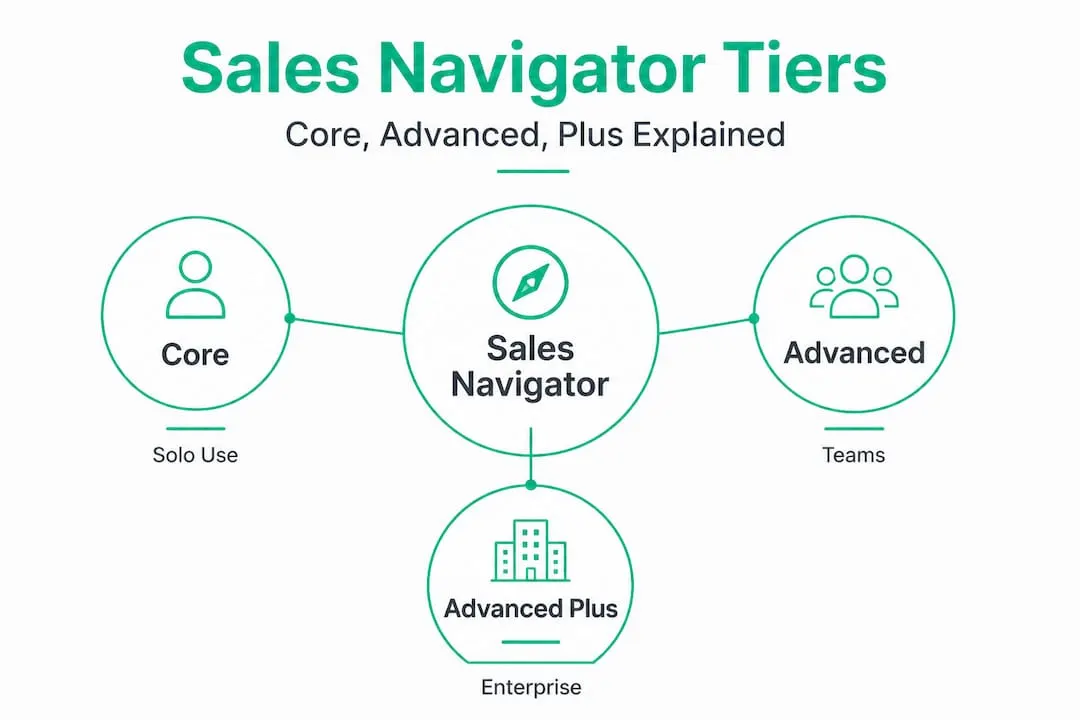
Here’s how the tiers compare at typical 2026 list pricing:
| Plan | Monthly price (per seat) | Best for |
|---|---|---|
| Core | $99 | Individual reps, freelancers |
| Advanced | $149 | Small sales teams, SDRs |
| Advanced Plus (Enterprise) | Custom | Large orgs, CRM integration |
The Core plan gives you access to advanced lead and account search filters, saved leads, InMail credits (50 per month), and real-time sales updates. It’s the entry point most solo reps need. The Advanced plan adds features like SmartLinks (track who opens your content), team collaboration tools, and shared lists. Advanced Plus layers in deep CRM syncing with platforms like Salesforce, making it attractive for structured sales teams, but pricing requires a direct LinkedIn sales conversation.
One term that confuses a lot of buyers is “seat.” A seat is simply an individual license tied to one LinkedIn account. Understanding what a seat means in this context matters because platforms that offer shared seat access operate differently from standard single-user licenses. Misunderstanding this can lead to buying the wrong plan type for your team.
Pro Tip: Start with Core before upgrading. Most individual reps never use 30% of Advanced features, and Core’s 50 monthly InMail credits are enough to run focused outreach campaigns without hitting a ceiling.
What often surprises buyers is that official licenses for Sales Navigator seats can be obtained at up to 50% off standard pricing, especially through verified reseller channels. That’s not a promotional claim. It’s a structural reality of how enterprise software licensing works in the B2B SaaS world. Referral partnerships and volume agreements between LinkedIn and authorized resellers mean significant savings are accessible, you just need to know where to look.
For a complete breakdown of what Sales Navigator does and how it fits a B2B strategy, the Sales Navigator B2B guide covers the platform’s core value from the ground up.
- Core plan: Best for individual reps running 1:1 personalized outreach
- Advanced plan: Built for teams sharing lead lists and tracking content engagement
- Advanced Plus: Designed for orgs that need CRM data sync and admin controls
- Annual billing typically saves 20% compared to monthly billing on all plans
Factors that impact Sales Navigator seat pricing
Now that you know the different pricing levels, let’s explore what actually drives price differences and opportunities to optimize.
Seat pricing varies significantly based on three main levers: license type, volume, and access channel. Miss any of these and you’re likely leaving money on the table.
License type is the first lever. Individual seats purchased directly from LinkedIn at retail pricing carry the highest cost per seat. Team licenses, which bundle multiple seats under one billing account, typically unlock volume discounts starting at around five seats. Enterprise licenses introduce custom negotiation, and LinkedIn’s sales team will often discount aggressively for large commitments, especially for annual contracts paid upfront.
Volume is the second lever. Even small teams can benefit here. Buying three or four seats together through an authorized reseller often reduces per-seat cost compared to buying them individually. Consider startup pricing strategies as a reference point. Startups that batch their software purchases and negotiate as a unit almost always pay less than individual contributors purchasing solo.

Access channel is where the biggest surprises live. LinkedIn’s direct checkout is the most expensive route. Authorized resellers, often operating through verified partnerships in the US and Europe, can offer the same official seat at significantly lower rates. The key word there is authorized. An unofficial third party offering credentials for a cut-rate price is a red flag, not a deal.
| Factor | Impact on price | Action to take |
|---|---|---|
| Individual vs. team license | High | Bundle seats when possible |
| Annual vs. monthly billing | Medium | Commit annually for 20% savings |
| Direct LinkedIn vs. reseller | High | Compare authorized reseller pricing |
| Volume (5+ seats) | Medium-High | Negotiate as a group |
| Hidden fees (onboarding, CRM) | Varies | Ask for full itemized quote |
Watch for hidden fees. Enterprise plans sometimes include professional services costs for CRM integration setup or admin training that aren’t obvious in the initial quote. Always request a full itemized breakdown before signing.
If Sales Navigator is one piece of a larger toolkit, reviewing your lean B2B outreach stack helps you identify where overlapping tools are eating into budget that could go toward better LinkedIn access. And if you’re already questioning whether Sales Navigator is the right fit at all, checking out Sales Navigator alternatives gives a useful side-by-side comparison.
- Ask any vendor: “Is this an official LinkedIn-authorized license?”
- Confirm invoicing comes through a legitimate platform like Stripe
- Verify the seat activates to your personal LinkedIn account within two business hours European time
- Never share login credentials as part of any discounted offer
Comparing Sales Navigator with top alternatives
Understanding how Sales Navigator is priced is only part of the puzzle. Let’s see how it stacks up against the top alternatives.
The good news for budget-conscious B2B teams is that alternatives to business.linkedin.com tools and Zoftwarehub.com offer genuinely similar features at competitive price points. The question isn’t whether alternatives exist. It’s whether they fit your specific prospecting workflow.
Zoftwarehub positions itself as an all-in-one sales intelligence platform. It provides contact enrichment, company data, and outreach sequencing in a single interface. For teams that want fewer tools and a simpler setup, Zoftwarehub can be a cost-effective consolidation move. However, its LinkedIn data depth is thinner than Sales Navigator’s native access, which matters when your prospecting relies on signal-based triggers like job changes or company news.
business.linkedin.com tools refers to LinkedIn’s broader suite, including Recruiter, Campaign Manager, and native Premium features. These tools aren’t one-to-one replacements for Sales Navigator, but some teams cobble together LinkedIn Premium Business with third-party enrichment tools to approximate Sales Navigator functionality at lower cost.
| Tool | Starting price (monthly) | LinkedIn data depth | Best use case |
|---|---|---|---|
| Sales Navigator Core | $99 | Native and deep | B2B prospecting at scale |
| Zoftwarehub | $79 | Moderate | All-in-one sales teams |
| LinkedIn Premium Business | $59 | Limited | Basic outreach, job seekers |
| Apollo.io | $49 | Moderate (via integration) | High-volume email outreach |
Alternatives make the most sense when your team is doing primarily high-volume email outreach rather than LinkedIn-native messaging, or when your budget simply can’t stretch to $99 per seat. However, if InMail response rates and LinkedIn-specific social selling are central to your strategy, alternatives often require workarounds that eat more time than they save.
For context on pricing for profit strategies, the principle is the same: you should optimize for revenue impact per dollar spent, not lowest cost in isolation. A cheaper tool that produces fewer qualified conversations costs more in reality.
Pro Tip: Before switching from Sales Navigator to an alternative, run a 30-day comparison. Track qualified conversations, pipeline generated, and time spent per outreach. Numbers rarely lie, and most alternatives offer free trials long enough to get real data.
Reviewing business.linkedin.com alternatives in detail reveals that the right answer depends heavily on your sales motion. High-volume outbound teams may thrive on alternatives. Relationship-focused enterprise sellers typically find Sales Navigator indispensable.
Maximizing ROI and practical strategies for getting Sales Navigator cheaper
With alternatives and price factors explained, let’s focus on how to practically use this information to save money and increase prospecting performance.
There’s a clear gap between teams that pay full price for Sales Navigator and teams that don’t. The difference isn’t luck or negotiating talent. It’s knowing the right strategies and applying them before committing to a purchase.
Here are the most effective tactics, in order of impact:
- Join a group seat program. Platforms like SalesNavSplit pool buyers into authorized group licenses, passing the volume discount directly to individual reps. This is the single biggest per-seat saving available for individuals who can’t purchase 10+ seats on their own.
- Buy annual, not monthly. Annual billing almost always saves 20% compared to month-to-month. If you know you’ll use the tool for a year, paying upfront is a straightforward win.
- Negotiate directly with LinkedIn for teams. Once you’re looking at five or more seats, LinkedIn’s own enterprise team will negotiate. Request a custom quote rather than going through the checkout flow. The checkout price is not the floor.
- Review your current seat usage. Many teams maintain seats for reps who barely use the platform. An internal audit identifying unused or underused seats before your renewal date is free money.
- Use advanced search features consistently. The ROI of Sales Navigator lives in its advanced search capabilities. If your team isn’t using Boolean search, persona filters, and account-level targeting, you’re paying for features you’re ignoring.
“The fastest way to improve Sales Navigator ROI isn’t to negotiate a better price. It’s to make sure every seat you already pay for is being used at full capacity. Price optimization and workflow optimization together are what compound into real results.”
For teams building outreach from scratch, following proven Sales Navigator tips accelerates the learning curve and prevents the most common setup mistakes. Pairing that with a structured sales prospecting workflow turns the tool from a passive database into an active pipeline engine.
Watch out for these common compliance mistakes when pursuing discounted seats. Any offer that asks you to share your LinkedIn password, log in through a third-party portal, or use a “shared account” is not a legitimate seat-sharing arrangement. Legitimate platforms using LinkedIn OS best practices never require credential sharing. Each authorized seat connects to your own LinkedIn account independently.
Pro Tip: Always confirm that your discounted seat vendor provides an official invoice, ideally through a recognized payment processor like Stripe. This protects you if a compliance question ever arises and confirms the license is authentic.
The combination of group purchasing, annual billing, workflow optimization, and verified reseller access is what separates teams that treat Sales Navigator as an expensive line item from teams that treat it as a net-positive investment.
Why most Sales Navigator buyers overpay—and what really works
Here’s the uncomfortable truth about Sales Navigator pricing: most teams overpay not because the savings don’t exist, but because they never look for them. LinkedIn’s direct checkout is fast, familiar, and doesn’t require a conversation. So that’s what most people use. The result is paying $99 to $149 per seat when verified alternatives offer the same license for closer to $50 to $75.
The second reason is fear. Sales managers worry that discounted seats aren’t legitimate, that the account might get flagged, or that they’ll end up in a gray-area arrangement that jeopardizes their company’s LinkedIn presence. That concern is valid, but it only applies to illegitimate sellers. Authorized resellers operating through verified partnerships and official LinkedIn licensing channels carry zero compliance risk. The key is doing the 10 minutes of verification work before you buy.
What experienced B2B sales professionals know is that the real value of Sales Navigator isn’t in the price you pay. It’s in the smart advanced search tactics that most reps never fully learn. Teams that use persona filters, company growth signals, and saved search alerts consistently outperform teams that use Sales Navigator as a slightly better version of a basic LinkedIn search. The tool is only as powerful as the person using it.
The hardest lesson for sales leaders is that buying the right number of seats matters as much as buying at the right price. Overbuying means wasted budget. Underbuying means your outreach is inconsistent because reps are sharing access in ways that create workflow friction or compliance exposure. Getting the seat count right, then optimizing the price through legitimate channels, is the formula that actually works.
Unlock discounted Sales Navigator seats for your team
If you’ve made it through this guide, you now know more about Sales Navigator pricing than most sales managers with years of experience. You understand the tiers, the levers, the alternatives, and the strategies that produce real savings without cutting corners.
The next step is straightforward. SalesNavSplit provides discounted Sales Navigator seats through verified reseller partnerships in the US and Europe, offering official licenses at up to 50% off standard pricing. Every seat is authentic, every invoice comes through Stripe, and activation happens within two business hours European time. There’s no credential sharing, no gray-area arrangements, and no compliance risk. Whether you need one seat or ten, you can get a transparent quote and be up and running faster than going through LinkedIn’s direct checkout.
Frequently asked questions
What is the average cost per seat for LinkedIn Sales Navigator in 2026?
Most seats range from $90 to $150 per month at standard pricing, but up to 50% off is available through group or volume purchases via authorized resellers.
Are there legitimate ways to get LinkedIn Sales Navigator seats at lower prices?
Yes. Official vendors and seat-sharing platforms like SalesNavSplit provide authentic licenses at reduced rates, sourced through verified reseller partnerships without credential sharing or compliance risk.
How do Sales Navigator alternatives compare in price and features?
Alternatives like Zoftwarehub and business.linkedin.com tools often compete on price, but similar core features vary in LinkedIn data depth, making comparison tables essential for choosing the right fit.
Is seat sharing or splitting compliant with LinkedIn’s policies?
Legitimate seat splitting uses official LinkedIn-authorized licenses managed through verified platforms, where each seat is connected to a personal LinkedIn account independently, without shared credentials.