
The Role of Google Account in Sales Tools Explained
The Role of Google Account in Sales Tools Explained
TL;DR:
- A Google account extends beyond email access to serve as the core authentication, data, and permission layer in sales workflows, enabling deep CRM integrations and accurate ad attribution. Proper configuration of OAuth permissions and structured collaboration through Google Workspace tools significantly enhance sales team productivity and data integrity. Linking Google Ads and maintaining security audits unlocks valuable high-intent account signals, while integrating LinkedIn Sales Navigator further enriches prospecting efforts.
Most sales professionals think of their Google account as a login credential. A way into Gmail. Maybe a shared calendar. But that framing leaves serious capability on the table. The role of Google account in sales tools runs far deeper than email access. It acts as the authentication backbone for CRM integrations, the data pipe for advertising attribution, and the permission layer that controls what your sales stack can actually do. If you’re managing a B2B sales operation in 2026 and haven’t thought carefully about how your Google account is configured, you’re almost certainly missing workflow gains your competitors already have.
Table of Contents
- Key takeaways
- The role of Google account in sales tools and CRM workflows
- Google Ads and your sales pipeline
- Securing your Google account across sales tools
- Team collaboration through Google account-powered workflows
- My take on Google accounts in the modern sales stack
- Complement your Google-powered stack with LinkedIn Sales Navigator
- FAQ
Key takeaways
| Point | Details |
|---|---|
| Google account as integration hub | Your Google account is the auth layer connecting CRMs, calendars, and ad platforms into a single sales workflow. |
| Native CRM integrations beat plugins | API-based Google Workspace CRM connections keep data current without manual updates or third-party scrapers. |
| OAuth permissions need active management | Incomplete or overly broad OAuth consent is the most common cause of integration failures and security gaps. |
| Ad data enriches your pipeline | Linking Google Ads through your account lets sales teams identify and prioritize high-intent accounts automatically. |
| Collaboration scales with Google Workspace | Shared drives, Chat, and Calendar tied to your Google account reduce handoff failures as teams grow. |
The role of Google account in sales tools and CRM workflows
The distinction that matters most here is native versus plugin-based integration. A plugin bolts onto Gmail to display a sidebar. A native API integration reads your email metadata and calendar events in real time, which means your CRM data is always current without anyone touching it manually. Copper CRM is the clearest example: it runs entirely inside Google Workspace, auto-enriching contacts from every email and logging meetings from Calendar without any manual entry.
NetHunt CRM and Pipedrive take a similar approach. They request OAuth scopes from your Google account to access Gmail thread history, Google Contacts, and Calendar data, then surface deal records directly inside your inbox. The result is that your sales rep never has to leave Gmail to update a deal stage or log a call.
Here’s what the OAuth part actually means in practice:
- Read scopes let the CRM see email content and metadata to identify who you’re talking to and when
- Write scopes allow the CRM to create calendar events, send emails from your account, or update contacts
- Directory scopes pull your organization’s contact list to auto-populate records
Incomplete OAuth consent is the most common cause of Gmail-CRM integration failures. If a rep grants read access but not write access during setup, the CRM can see emails but can’t log activity back. Most reps don’t know this happened until they notice their deal timeline is missing entries.
Authentication type also matters at scale. Service Accounts work better for enterprise-wide automation across shared drives, while OAuth is the right choice for individual sales rep workflows. Using one where the other is appropriate either limits what the tool can do or introduces unnecessary access risk.
Pro Tip: When setting up any CRM with Google Workspace, walk through each OAuth permission screen yourself before rolling it out to the team. Reps who click through permission dialogs quickly almost always miss a scope that breaks functionality later.
Google Ads and your sales pipeline
This is where the google account benefits for sales get genuinely underappreciated. Most sales teams treat Google Ads as a marketing function with no direct connection to their CRM pipeline. That’s a missed opportunity.

When you link Google Ads to your CRM through a shared Google account, you unlock attribution that goes well beyond form fills. Some systems sync data weekly to match anonymous ad clicks to existing accounts in your CRM, which means your sales team can see which companies are engaging with your ads before anyone fills out a contact form. That’s account-level intent data, available because your Google Ads account and your CRM share authentication through your Google account.
The practical value for sales looks like this:
- A company clicks your Google Ad but doesn’t convert. Your CRM flags them as a high-intent account based on the ad interaction
- Your rep gets an automated task to reach out within 24 hours
- The GCLID (Google Click Identifier) ties the eventual deal back to the specific ad campaign for accurate ROI reporting
The GCLID tracking gap is a real problem. When a prospect clicks an ad and then fills out a form days later on a different browser or device, the GCLID drops and the attribution breaks. Advanced Google Ads-to-CRM integrations using a properly configured Google account handle this by matching company-level signals instead of relying solely on individual cookie tracking.
For pipeline attribution and ROI, this integration approach gives sales managers actual data on which ad campaigns are filling the pipeline versus which ones are just generating clicks.
Pro Tip: Link your Google Ads account to your CRM’s Google Workspace integration before you run your next campaign. You’ll be able to retroactively match historical ad interactions to existing accounts in your pipeline.
Securing your Google account across sales tools
Every CRM, dialer, prospecting tool, and reporting platform you connect to your Google account adds an access point. Each of those access points is a potential breach vector if permissions aren’t managed deliberately. Security risks in Google Workspace primarily come from how third-party app permissions and file sharing are managed, not from Google’s infrastructure itself.
The least privilege principle is the starting point. Every app connected to your Google account should have only the permissions it actually needs to function. Google’s Admin Console does not automatically group or rank apps by sensitivity, which means manual reviews of OAuth app permissions are not optional. They’re the only way to know what each connected tool can actually access.
What an effective permission audit looks like:
- Go to Admin Console, navigate to Security, then API Controls
- Review every third-party app with access to your Workspace
- Check what scopes each app holds. “Read all Gmail messages” for a tool that only needs calendar access is a red flag
- Revoke access for apps that are no longer in active use
- Document what each approved app is allowed to access and why
Data governance is the layer above permissions. Sales teams must actively align on what data definitions mean across sales, marketing, and operations so that CRM data pulled through Google Workspace integrations stays consistent and usable. A contact record enriched through Gmail integration that one team calls a “lead” and another calls a “prospect” creates reporting confusion that compounds over time.
For teams using compliant outreach tools, maintaining clear governance around Google account permissions is equally important as the outreach strategy itself.
Pro Tip: Run a permission audit every quarter. Sales tech stacks change fast, and apps that a former rep connected to your Workspace may still hold active access to company data.
Team collaboration through Google account-powered workflows
The google account features for sales management that get the least attention are the ones hiding inside Google Workspace itself. Shared drives, Google Chat, and Calendar don’t feel like “sales tools,” but when they’re properly connected to your CRM and prospecting workflow, they change how a team operates.
Here’s how a well-structured Google account-powered sales workflow compares to a disconnected one:
| Workflow element | Disconnected approach | Google account-integrated approach |
|---|---|---|
| Deal documents | Stored in individual reps’ drives | Shared drive linked to CRM deal record |
| Meeting scheduling | Manual back-and-forth emails | Calendar integration auto-logs meetings to CRM |
| Team handoffs | Re-entering context in new threads | Shared Chat spaces with full deal history |
| Lead enrichment | Manual research and data entry | Auto-enriched from Gmail interactions |
| Reporting | Weekly manual exports | Real-time CRM sync from Google Workspace |
Automated drive file syncing produces 45% smoother data synchronization, cutting the manual bottlenecks that slow down reporting and lead enrichment. That number is meaningful at the team level. If three reps each spend 30 minutes a day on manual data entry that Google Workspace automation handles, you’ve recovered 22.5 hours a week across the team.
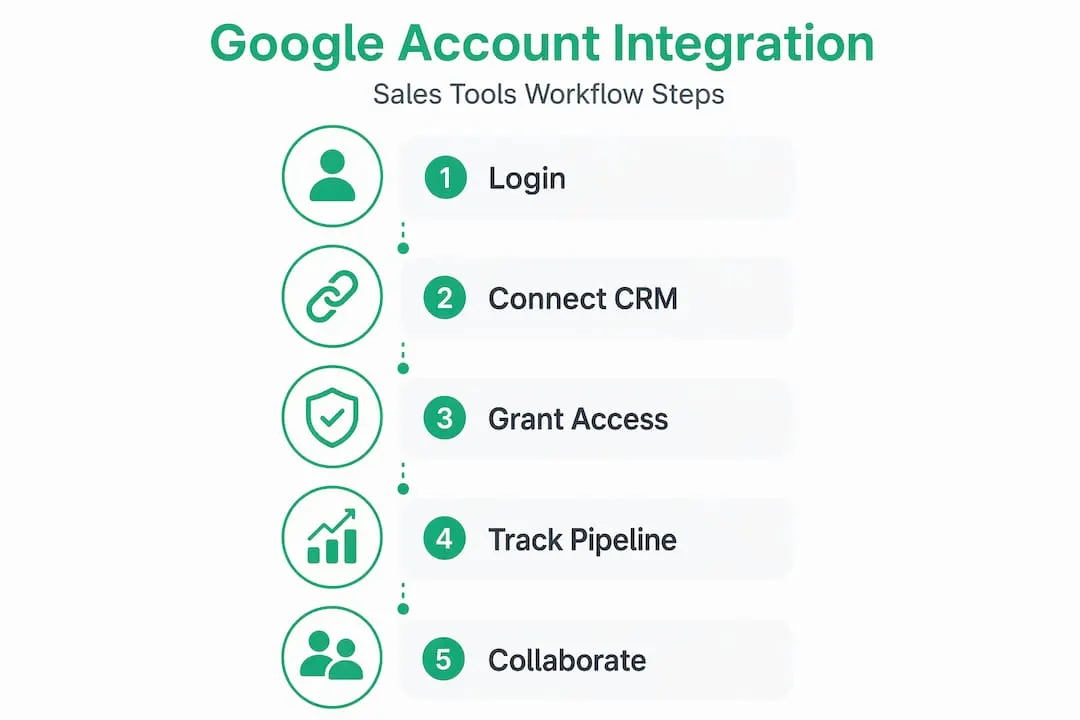
Setting up this kind of workflow doesn’t require complex configuration. Here’s a practical sequence:
- Connect your CRM to Google Workspace using your Google account’s OAuth credentials
- Set up a shared drive folder structure that mirrors your CRM’s pipeline stages
- Link Calendar so every customer meeting automatically creates a CRM activity
- Create a Chat space for each major account or deal, tied to the shared drive folder
- Configure automated notifications in Chat when CRM deal stages change
Google Workspace CRM integrations convert daily communications into structured sales data, meaning every email thread and calendar event becomes a logged touchpoint in your pipeline without any manual work. That’s the importance of google account in sales in concrete terms. It’s not a convenience feature. It’s a systematic reduction of the gap between what actually happened in a deal and what your CRM records.
For teams building out their prospecting workflow, the sales prospecting workflow guide from Salesnavsplit covers how to connect these tools into a working sequence rather than running them in isolation.
My take on Google accounts in the modern sales stack
I’ve watched sales teams spend six figures on CRM licenses and prospecting tools while leaving their Google Workspace sitting mostly unconfigured. In my experience, that’s where the real productivity drag lives. Not in the tool selection. In the integration layer that nobody took time to set up properly.
The OAuth permission issue is the one I see trip up teams most often. Someone connects the CRM during initial setup, grants partial permissions, and then three months later wonders why the deal timeline has gaps. The fix takes ten minutes. Finding the problem takes weeks.
What I’ve found actually works is treating the Google account configuration as a formal part of sales tool onboarding, not an IT afterthought. Every new CRM connection should have a checklist: which scopes are needed, who reviewed them, and when the next audit is scheduled. Teams that do this have dramatically fewer data integrity problems downstream.
The collaboration side is the one most people underestimate. When every rep’s Gmail, Calendar, and shared drive are properly connected to the CRM through the same Google account configuration, team handoffs stop losing context. A rep going on leave doesn’t mean a prospect falls through the cracks. That institutional memory preservation is worth more than most sales managers give it credit for.
My practical advice: start with one CRM connection and get it fully configured before adding the next tool. The urge to connect everything at once usually results in half-functional integrations across the board.
— Toinon
Complement your Google-powered stack with LinkedIn Sales Navigator
Your Google account-powered CRM and ad attribution workflow gives you a strong operational foundation. But for B2B outreach, the prospecting layer matters just as much as the workflow layer. That’s where LinkedIn Sales Navigator fits.
Salesnavsplit provides official LinkedIn Sales Navigator seats at up to 50% off standard pricing, sourced through verified reseller partnerships in the US and Europe. Seats activate within 24 to 48 hours, billing runs through Stripe, and every license is fully compliant with LinkedIn’s terms of service. For sales teams already using Google Workspace-connected CRMs, adding Sales Navigator creates a prospecting-to-pipeline flow that covers both inbound and outbound. You can explore your lean B2B outreach stack or go straight to the official licensed seats at Salesnavsplit.
FAQ
What is the role of Google account in sales tools?
Your Google account serves as the authentication and data layer connecting CRMs, calendar tools, ad platforms, and collaboration apps into a unified sales workflow. Without it properly configured, integrations either fail or operate with incomplete data.
Why do CRM integrations with Google Workspace fail?
Incomplete OAuth consent is the most common cause. When users skip or partially complete permission screens during setup, the CRM loses access to specific data types it needs to log activity and enrich contacts.
How does a Google account help with sales pipeline attribution?
Linking Google Ads to your CRM through a shared Google account enables account-level ad engagement tracking, so sales teams can identify high-intent companies from ad data before any form is submitted.
How often should sales teams audit Google Workspace app permissions?
A quarterly review of OAuth permissions in the Admin Console is a reliable baseline. Any time a team member leaves or a sales tool is retired, an immediate audit of connected apps is worth the 20 minutes it takes.
Can Google account features replace a dedicated sales CRM?
No. Google Workspace provides the integration foundation, but a CRM manages deal stages, pipeline reporting, and structured sales data. Google Workspace and a CRM work best as a connected pair, not as substitutes for each other.
Recommended
- Master Sales Navigator account setup for scalable results - SalesNavSplit Blog
- Sales tools checklist: Build your lean B2B outreach stack - SalesNavSplit Blog
- The best types of B2B sales tools for smarter prospecting - SalesNavSplit Blog
- Stay compliant: smart sales tools for LinkedIn & B2B outreach - SalesNavSplit Blog