
Customer Engagement Workflow: Build One That Works
Customer Engagement Workflow: Build One That Works
TL;DR:
- A customer engagement workflow is a structured process that manages interactions across multiple channels to ensure consistent, personalized communication. Building such workflows involves centralizing data, mapping customer journeys, defining decision points, and using AI for proactive engagement. Properly designed workflows improve retention, reduce customer effort, and prevent common structural mistakes like data silos and trigger fatigue.
A customer engagement workflow is a structured set of processes and automation steps designed to manage and optimize interactions across multiple channels, ensuring consistent and personalized communication at every stage of the customer journey. Sales and marketing teams that build these workflows correctly see measurable gains: AI-driven automation doubles NPS scores and cuts customer effort scores by 25–35% within 18 months. The difference between teams that grow accounts and teams that lose them often comes down to whether their customer interaction process runs on a defined system or on individual instinct. This article gives you the exact components, steps, and guardrails to build one that performs.
What does an effective customer engagement workflow require?
A customer engagement workflow is not just an email sequence. It is an operating system that centralizes every interaction across email, chat, phone, social media, and CRM platforms like Salesforce and HubSpot, so no context is lost when a customer switches channels.

The industry term for this discipline is Customer Interaction Management (CIM). CIM covers the strategic orchestration of every touchpoint, not just the output of individual service responses. Understanding this distinction matters because automating without mapping the full interaction lifecycle is the single greatest cause of workflow failure, producing siloed data and customer frustration.
Core components every workflow needs
Before you build anything, confirm these building blocks are in place:
- Centralized data source. Every channel, including email, WhatsApp, phone, and CRM, must write to one unified database. Unified data enables next-best actions with full context and reduces repeat explanations by 15–20%.
- Interaction lifecycle map. Define the five stages explicitly: intake, routing, ownership, resolution, and follow-up. Skipping any stage creates gaps.
- Automation platform with a visual builder. Tools like HubSpot Workflows, Salesforce Flow, or Braze let marketers adjust journeys without waiting on engineering.
- Team alignment on ownership. Every workflow task must have a named owner. Ambiguity kills follow-through.
Pro Tip: Before selecting any tool, audit whether your current data lives in more than two places. If it does, fix the data architecture first. No automation platform compensates for fragmented inputs.
79% of customers expect consistent, effortless communication across all channels. That expectation is not optional to meet. It is the baseline your workflow must clear before personalization or automation adds any value.
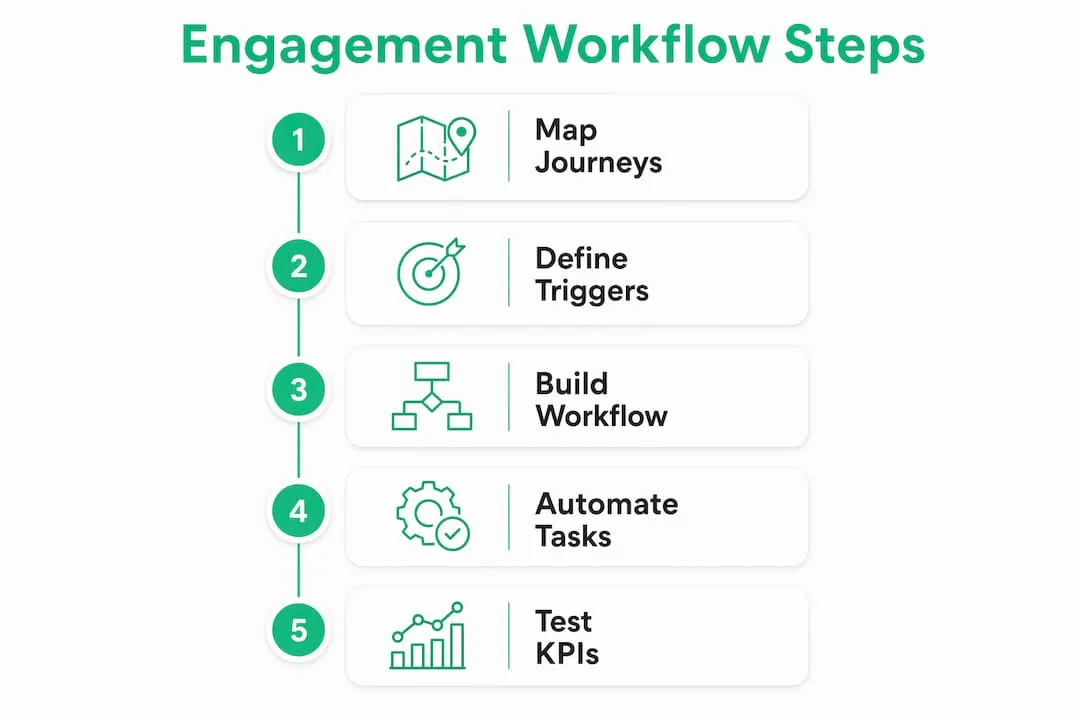
How to design and implement a workflow step by step
Building a client engagement strategy from scratch follows a clear sequence. Skipping steps creates the exact fragmentation problems described above.
Step 1: Map key customer journeys
Start with your three highest-volume interaction types: new lead onboarding, post-purchase follow-up, and renewal or churn risk. For each, document every touchpoint a customer has with your brand from first contact to resolution. Use a whiteboard, Miro, or Lucidchart to make this visual.
Step 2: Define decision points, triggers, and ownership
At each touchpoint, ask three questions. What action triggers the next step? Who owns the response? What happens if no action is taken within a set time? Document the answers as a decision map. Explicit ownership assignments prevent tasks from being dropped and close the gaps that cause churn.
Step 3: Build the workflow in your chosen platform
Connect your CRM to your communication channels inside a single workflow builder. HubSpot’s visual workflow tool, Salesforce Flow, and Klaviyo each support multi-channel triggers. The goal is one canvas where email sends, CRM updates, task assignments, and Slack notifications all live together.
Step 4: Automate routine tasks
Automating ticket categorization and follow-up messaging frees your team to focus on resolution and personalized communication. Set automation for: welcome sequences, meeting reminders, post-demo follow-ups, and renewal alerts triggered 60 days before contract end.
Step 5: Test and monitor KPIs
Run every new workflow through a 30-day pilot with a subset of contacts. Track customer effort score, NPS, response time, and conversion rate at each stage. Adjust branches that show drop-off before rolling out to the full database.
| Workflow stage | Primary tool | Key KPI to track |
|---|---|---|
| Lead intake and routing | Salesforce, HubSpot | Response time under 5 minutes |
| Onboarding sequence | Klaviyo, Braze | Completion rate, NPS at day 30 |
| Renewal and retention | Gainsight, HubSpot | 90-day retention rate |
| Support and resolution | Zendesk, OTRS | Customer effort score |
Visual canvas builders let marketers change journeys and track performance without constant engineering involvement. That flexibility is what allows teams to iterate weekly instead of quarterly.
What are the most common mistakes in managing engagement workflows?
Most workflow failures are not technical. They are structural. The same four mistakes appear repeatedly across sales and marketing teams.
Mistake 1: Data silos across channels
When your email platform, CRM, and support tool each hold separate customer records, agents repeat questions and customers repeat themselves. The fix is a single source of truth. Every channel must write back to one central record, whether that lives in Salesforce, HubSpot, or a dedicated customer data platform like Segment.
Mistake 2: Trigger fatigue
Excessive automated messages cause unsubscribes and brand damage. Frequency caps and behavior-based cooldowns are non-negotiable guardrails. A customer who just opened a support ticket should not receive a promotional email the same afternoon.
“The most dangerous workflow is one that runs perfectly on paper but sends the wrong message at the wrong moment because no one set a cooldown rule.”
Mistake 3: No named workflow owner
Monthly audits of ownership are critical. Workflows break when team members change roles and no one updates the assignment. Assign a primary and backup owner for every active workflow, and review the list on the first Monday of each month.
Mistake 4: Skipping proactive engagement
Most teams build reactive workflows. The highest-performing teams build proactive ones. Behavioral signals like login frequency drops, feature non-use, or support ticket spikes are predictors of churn. Proactive workflows triggered 30–60 days before a predicted cancellation measurably improve 90-day retention in B2B and SaaS environments.
Pro Tip: Set a “health score” field in your CRM that aggregates login frequency, support volume, and product usage. Trigger a proactive outreach workflow when the score drops below a defined threshold.
How do AI and automation tools improve engagement workflows?
AI changes what is possible in workflow management systems by moving from rule-based triggers to intent-based responses. The difference is significant in practice.
Rule-based workflows fire when a condition is met: “If contact opens email, send follow-up after 2 days.” AI-driven workflows fire when intent is detected: “If sentiment analysis flags frustration in a support chat, escalate to a senior rep immediately.”
AI analyzes customer sentiment and intent in real time, driving personalized routing and improved customer experience at scale. Platforms like Talkdesk, NICE CXone, and Salesforce Einstein each apply this capability to live interactions.
What AI adds to each workflow stage
- Intake and routing: AI classifies inbound tickets by urgency and topic, routing to the right team without manual triage.
- Personalization at scale: AI reads behavioral patterns across thousands of contacts and adjusts message timing, channel, and content per individual.
- Retention prediction: Machine learning models score churn risk from product usage data, triggering retention sequences before customers decide to leave.
- Performance optimization: AI identifies which workflow branches underperform and recommends adjustments based on conversion data.
| AI capability | Business impact | Example platform |
|---|---|---|
| Sentiment analysis | Faster escalation, lower effort score | NICE CXone, Talkdesk |
| Behavioral triggers | Higher retention, proactive outreach | Braze, Salesforce Einstein |
| Predictive churn scoring | Earlier intervention, reduced churn | Gainsight, Totango |
| Automated personalization | Higher open and conversion rates | Klaviyo, Iterable |
For sales teams specifically, pairing AI-driven workflows with behavioral signal outreach creates the kind of timely, relevant contact that converts. Generic mass outreach does not compete with a message triggered by a prospect’s actual behavior.
Key Takeaways
A customer engagement workflow performs best when it combines centralized data, explicit ownership, proactive automation, and AI-driven personalization into one connected system.
| Point | Details |
|---|---|
| Centralize all data first | Unify email, phone, chat, and CRM into one source before building any automation. |
| Map the full lifecycle | Define intake, routing, ownership, resolution, and follow-up before selecting tools. |
| Guard against trigger fatigue | Set frequency caps and cooldowns to prevent over-messaging and unsubscribes. |
| Assign explicit ownership | Name a primary and backup owner for every workflow and audit monthly. |
| Use AI for proactive outreach | Trigger retention workflows 30–60 days before predicted churn, not after it happens. |
Why most teams are building workflows backward
I have reviewed dozens of sales and marketing workflows over the years, and the pattern is almost always the same. Teams pick the tool first, then reverse-engineer a process to fit it. HubSpot gets purchased, sequences get built, and six months later someone asks why the data does not match across platforms.
The teams that actually see results treat the workflow as an operating system, not a campaign. They map the customer interaction process on paper before they touch a single platform setting. They assign owners before they write a single trigger. They define what “done” looks like for every interaction before they automate anything.
The other thing I have seen consistently: teams underestimate how fast workflows go stale. A workflow built in January for a product that has since added three features is actively misleading customers by February. Monthly audits are not optional maintenance. They are the practice that separates teams with a living system from teams with an expensive diagram.
The LinkedIn B2B engagement layer is one area where I see the biggest gap between what teams intend and what they execute. Prospecting workflows on LinkedIn require the same rigor as any other channel: defined triggers, ownership, and follow-up cadences. Without that structure, even the best prospecting data produces inconsistent results.
— Toinon
Upgrade your workflow with the right prospecting tools
Building a strong customer engagement workflow requires the right data at the right time. LinkedIn Sales Navigator is one of the most effective tools for B2B prospecting and outreach, giving sales teams access to real-time signals, advanced filters, and direct InMail capabilities that feed directly into your engagement sequences.
Salesnavsplit provides official Sales Navigator seats at up to 50% off standard LinkedIn pricing, sourced through verified reseller partnerships in the US and Europe. Seats activate within two business hours European time, billing runs through Stripe, and every license is fully compliant with LinkedIn’s terms of service. If your team is building or scaling a workflow in 2026, check the current Sales Navigator discount before paying full retail price.
FAQ
What is a customer engagement workflow?
A customer engagement workflow is a structured process that manages and automates customer interactions across channels like email, chat, phone, and social media. It ensures consistent, personalized communication from first contact through retention.
What tools are used to build engagement workflows?
CRM platforms like Salesforce and HubSpot, communication tools like Braze and Klaviyo, and support platforms like Zendesk and OTRS are the most common. Visual workflow builders within these tools let marketers build and adjust journeys without engineering support.
How does AI improve a customer engagement workflow?
AI adds real-time sentiment analysis, behavioral trigger detection, and predictive churn scoring to standard rule-based workflows. Platforms like NICE CXone and Talkdesk apply these capabilities to live interactions, improving routing accuracy and personalization at scale.
What is trigger fatigue and how do you prevent it?
Trigger fatigue occurs when automated workflows send too many messages in a short period, causing customers to unsubscribe or disengage. Frequency caps and behavior-based cooldowns prevent over-messaging and protect brand reputation at high-intent stages.
How often should you audit a customer engagement workflow?
Monthly audits are the standard for high-performing teams. Each audit should verify ownership assignments, check KPI performance by branch, and update triggers to reflect current product or service changes.
Recommended
- Sales Outreach Trends 2026: What Actually Drives Results - SalesNavSplit Blog
- Workflow for Activating Sales Tools: A 2026 Guide - SalesNavSplit Blog
- Build a sales follow-up workflow that closes more deals - SalesNavSplit Blog
- What is sales engagement? Master multichannel LinkedIn outreach - SalesNavSplit Blog