
LinkedIn Reseller Explained: Save on Sales Navigator Safely
LinkedIn Reseller Explained: Save on Sales Navigator Safely
TL;DR:
- Not all LinkedIn Sales Navigator resellers are legitimate, and choosing the wrong model can risk account bans and data loss. Authorized resellers provide compliant, named licenses at significant savings, whereas gray-market or rental arrangements pose operational and compliance dangers. Making informed, compliant choices ensures ongoing access and data security for your sales team.
Not all LinkedIn Sales Navigator resellers are created equal, and assuming they are could cost your sales team far more than a monthly subscription fee. The market is flooded with offers promising steep discounts on Sales Navigator access, but the gap between a legitimate reseller and a risky gray-market arrangement is enormous. Understanding that gap is the difference between a smart cost-saving move and a compliance nightmare that leaves your team locked out of their accounts mid-quarter.
Table of Contents
- What is a LinkedIn reseller?
- How discounted LinkedIn access works: The reseller models
- Risks and compliance: What sales teams need to know
- Making the smart choice: What to consider when selecting LinkedIn access
- Why chasing deep discounts may hurt your team more than it helps
- Get compliant, affordable access for your sales team
- Frequently asked questions
Key Takeaways
| Point | Details |
|---|---|
| Not all resellers are equal | Official and non-official LinkedIn resellers differ in access, risk, and compliance. |
| Cheap access can cost you | Non-compliant or rental models may result in permanent account bans and data loss. |
| Choose compliance first | Always verify legitimacy before buying to protect your team and sales tools. |
| Smart savings balance risk | Weigh cost benefits against business continuity, reputation, and operational reliability. |
What is a LinkedIn reseller?
With the confusion outlined, let’s explore what a LinkedIn reseller actually is and how their offers are structured.
A LinkedIn reseller, in the context of Sales Navigator, is a third-party company or individual that sells access to LinkedIn’s premium sales tool, typically at a lower price than buying directly through LinkedIn. This sounds straightforward, but the model varies wildly depending on who you’re dealing with. Understanding those variations is the first step toward making a smart purchasing decision for your team.
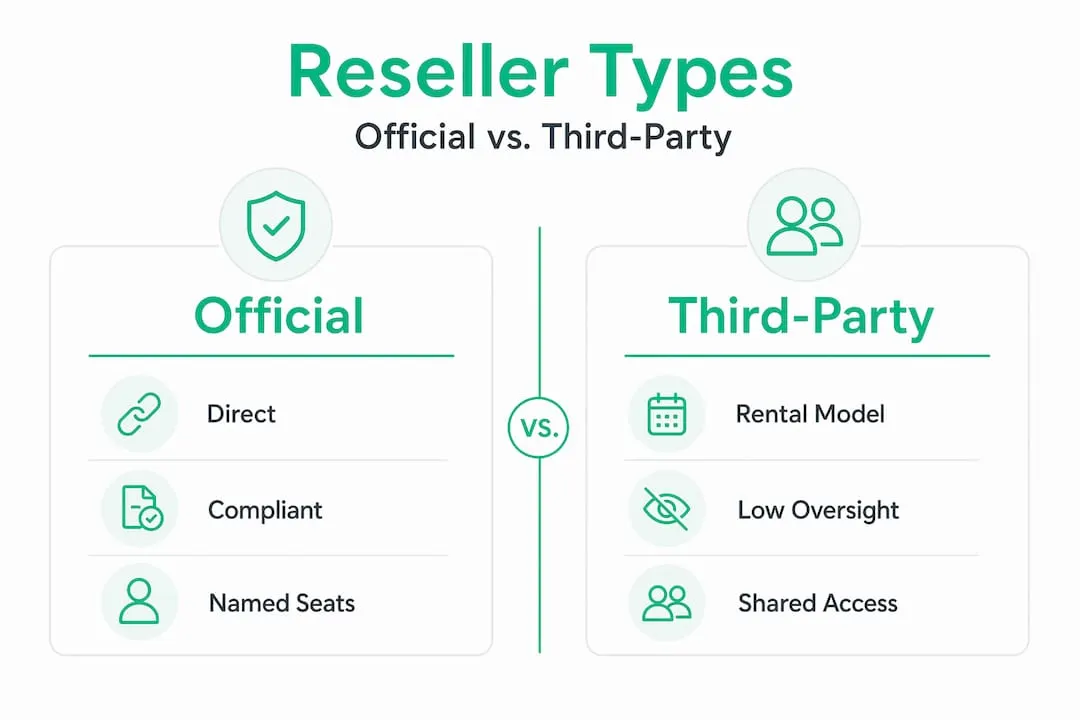
Mainstream resellers operate through authorized volume agreements with LinkedIn. They purchase licenses in bulk at negotiated rates and pass some of those savings on to their customers. Your team gets official, named licenses billed through legitimate channels. These arrangements are stable, trackable, and compliant with LinkedIn’s terms of service.
Non-standard or gray-area models are a different story entirely. These include:
- Rental arrangements where you’re accessing someone else’s account or license on a temporary basis
- Voucher-based activation that bypasses standard LinkedIn billing
- Shared login setups where multiple users access a single account
- Activation codes sourced from regions with lower pricing without proper authorization
- Resellers who cannot provide any documentation of their relationship with LinkedIn
As our LinkedIn reseller guide explains, the distinction between these models is what separates a smart purchase from a serious liability.
Why do legitimate resellers matter beyond just compliance? Because your sales team’s data lives inside Sales Navigator. Lead lists, CRM integrations, saved searches, InMail history, and account activity are all tied to those licenses. When a reseller model is unstable or non-compliant, all of that data becomes vulnerable. A legitimate reseller relationship ensures that if something changes, you have a clear support channel and an official record of your purchase.
How discounted LinkedIn access works: The reseller models
Understanding different reseller models is key, so next we’ll break down exactly how each approach works for your sales team.
The price difference between models can look attractive on the surface. A direct LinkedIn subscription for Sales Navigator Advanced runs well over $100 per seat per month. Reseller offers can appear to cut that cost by 30%, 50%, or even more. But each model carries a different risk and reliability profile.
| Model | Cost | Control | Security and Compliance | Typical Risks |
|---|---|---|---|---|
| Direct from LinkedIn | Highest | Full | Fully compliant | Cancellation, price increases |
| Authorized reseller | 20-50% savings | High | Compliant with verification | Reseller quality varies |
| Rental or voucher access | Cheapest upfront | Low | Non-compliant risk | Bans, shared logins, data loss |
| Activation code resellers | Medium | Medium | Gray area | Account flagging, instability |
For teams evaluating their Sales Navigator plan options, the cost comparison is compelling. But control and compliance are where the real story lives.
Rental and voucher models are where most sales teams run into trouble. Here are warning signs that an offer may carry extra operational risk:
- No direct LinkedIn billing or invoice from LinkedIn itself
- Shared login credentials for multiple users on one seat
- Voucher or activation code delivery instead of a standard account invitation
- No named account assigned to your specific email address
- Inability to add the seat to your existing LinkedIn account
- No written contract or terms of service from the provider
- Prices that seem dramatically lower than any verified reseller offers
Third-party “rental” and “discounted reseller” offers often market cost savings for seats, but they may introduce operational risk (seat instability, account restrictions) compared with buying seats directly from LinkedIn for the team.
Pro Tip: Before committing to any discounted arrangement, ask your provider directly whether your seat will appear under your personal LinkedIn account or if access requires a separate login. If it requires a separate login, that’s a significant red flag for account security and compliant LinkedIn prospecting.
The operational impact of choosing the wrong model can be severe. If a rental arrangement is flagged by LinkedIn, access can disappear without warning. All the lead data, saved accounts, and InMail credits associated with that “seat” may simply vanish. For a sales team mid-campaign, that’s a disaster with no easy fix.

Risks and compliance: What sales teams need to know
Now that you’ve compared the options, here are the compliance and operational risks you need to understand before choosing a reseller.
LinkedIn’s rules around account access are clear. You cannot transfer, sell, or share account credentials. Any arrangement that involves accessing someone else’s account, using shared credentials, or activating access through unofficial means is a direct violation of LinkedIn’s User Agreement. LinkedIn actively enforces these rules, and enforcement is not gentle.
Here are the top risks your team faces with non-compliant reseller arrangements:
- Permanent account ban. LinkedIn can and does permanently restrict accounts found to be in violation. This means your sales rep loses access to their LinkedIn profile entirely, not just Sales Navigator.
- Sudden loss of team access. Rental and voucher arrangements can be terminated without notice. If the account owner or voucher provider gets flagged, everyone depending on that access loses it instantly.
- Data loss. All saved leads, lead lists, notes, CRM sync data, and InMail history tied to a non-standard seat can be unrecoverable if the account is restricted or terminated.
- Reputation damage. For a sales rep whose LinkedIn profile is their professional identity and lead generation engine, a permanent ban is a career-level setback, not just a subscription problem.
- No recourse or appeal. Buying or transferring LinkedIn accounts is described by ConnectSafely as a violation of LinkedIn’s User Agreement and a source of permanent bans with no appeal. That last part deserves emphasis: no appeal.
The main edge-case with reseller-like approaches is not the prospecting workflow itself (filters, lead lists, CRM sync) but whether the arrangement violates LinkedIn’s access and transfer expectations and what happens operationally if accounts get restricted.
This is a critical distinction. The Sales Navigator features themselves, including advanced search filters, lead lists, and CRM integrations, are not the problem. The problem is the mechanism used to access them. A compliant arrangement gives you all the same features with none of the risk.
For teams managing compliant account management at scale, the key is ensuring every seat is traceable to a named user and properly licensed. Check out our Sales Navigator B2B guide for a full breakdown of what the tool can do when properly accessed.
Pro Tip: When evaluating any reseller, ask them to provide written documentation of their relationship with LinkedIn. Authorized resellers can typically share partner certifications or reseller agreement summaries. If a provider hesitates or cannot provide any documentation, treat that as a strong signal to look elsewhere.
Making the smart choice: What to consider when selecting LinkedIn access
Once you know the risks, here’s how to confidently evaluate your options and make the best decision for your sales team.
The good news is that making an informed decision is not complicated once you know what to look for. Use this checklist when evaluating any Sales Navigator provider.
| Criteria | What to verify | Risk level if missing |
|---|---|---|
| Price | Is it competitive but not suspiciously low? | Medium |
| Legitimacy and compliance | Can they show LinkedIn partner status or authorization? | High |
| Billing and invoicing | Do you receive an official invoice through a legitimate payment processor? | High |
| Support and reliability | Is there a support channel if access is disrupted? | Medium |
| Seat assignment | Is the seat assigned to your personal LinkedIn account? | High |
| Refund or recovery policy | What happens if access is revoked or suspended? | Medium |
Third-party offers often market cost savings, but they may introduce operational risk that makes the upfront savings irrelevant. A $50 monthly saving disappears fast if your team spends a week recovering from an account suspension.
Here are the top questions to ask any provider before signing up:
- Is this seat assigned directly to my LinkedIn account email address?
- Are you an authorized or verified reseller with a documented relationship with LinkedIn?
- What payment processor do you use, and will I receive an official invoice?
- What is your policy if my access is disrupted or suspended?
- Can I transfer my saved lead data and lists if I choose to switch providers?
- How long have you been operating, and can you provide customer references?
- What is your activation timeline, and how do I contact support after purchase?
The goal of saving with a LinkedIn reseller is entirely achievable without taking on unnecessary risk. You just need to ask the right questions upfront. For a broader look at how to build a more cost-effective prospecting operation, our smart LinkedIn sales strategies resource covers exactly that.
Balancing cost savings with long-term reliability is not just a financial decision. It’s a business continuity decision. Sales teams lose momentum when their tools go down unexpectedly. Every day a rep spends troubleshooting a suspended account instead of prospecting is a day of pipeline lost.
Why chasing deep discounts may hurt your team more than it helps
Here’s an uncomfortable truth most “save on Sales Navigator” articles won’t tell you: the cheapest option in the short term is often the most expensive option over a full sales year.
We’ve seen this pattern play out repeatedly. A small sales team finds a compelling offer, maybe 70% off standard pricing, signs up through an unofficial channel, and everything seems fine for a few weeks. Then LinkedIn’s systems flag the access pattern as unusual. Accounts get restricted. The rep loses not just Sales Navigator access but their entire LinkedIn presence, including years of connections, recommendations, and profile history. Suddenly, that $50 monthly saving has cost the team weeks of rebuilding and thousands in lost pipeline opportunity.
This is not a hypothetical edge case. It’s a predictable outcome of using non-compliant access models. LinkedIn’s enforcement has become more systematic, not less. The platform invests heavily in detecting unusual access patterns, shared credentials, and account transfers. The risk of getting caught is real and growing.
The harder lesson here is about risk tolerance in a sales context. Operational tools are not where you want to cut corners. Your CRM, your email platform, your LinkedIn presence: these are the infrastructure your revenue depends on. A disruption to any one of them has a direct and measurable impact on your pipeline. The understanding reseller risks framework we use at SalesNavSplit is built on a simple principle: genuine savings should never require accepting genuine risk.
There is a middle path. Legitimate reseller arrangements, sourced through verified partnerships with proper LinkedIn authorization, can deliver 40-50% savings without compromising your team’s account security or compliance standing. That’s not a “too good to be true” claim. It’s the outcome of properly structured volume agreements. The key is distinguishing that kind of offer from the rental or voucher models that use discount marketing to cover up serious compliance issues. If a provider cannot clearly explain how their model is authorized by LinkedIn, the discount is not worth it.
Get compliant, affordable access for your sales team
Putting everything you’ve learned into practice starts with finding a provider who can back up their discount claims with real authorization and transparency.
At SalesNavSplit, we source official LinkedIn Sales Navigator seats through verified reseller partnerships in the US and Europe. That means your team gets genuine, named licenses at around 50% of standard pricing, with fast activation within 24 to 48 hours, official invoicing through Stripe, and a clear support channel if you ever need it. No shared logins. No vouchers. No rental arrangements that put your LinkedIn accounts at risk. Just compliant, affordable access to the prospecting tools your team needs to close more deals.
Frequently asked questions
Is buying LinkedIn Sales Navigator from a reseller safe?
It depends entirely on the model. Official resellers with verified LinkedIn authorization can be safe and compliant, but rental and non-standard offers violate LinkedIn’s User Agreement and can result in permanent account bans with no appeal process.
What’s the difference between an official reseller and a rental offer?
Official resellers provide real, named licenses properly billed through LinkedIn’s systems, while rentals typically use shared credentials or voucher-like activation methods that increase compliance risk and can disappear without warning.
Can LinkedIn ban my account for using a reseller?
Yes. If the access method violates LinkedIn’s User Agreement, such as through account transfers or shared logins, LinkedIn can issue permanent bans with no appeal, affecting not just Sales Navigator access but your entire LinkedIn profile.
Are there real savings with licensed LinkedIn resellers?
Yes, genuine savings of 40-50% are achievable through properly authorized reseller arrangements. However, offers marketing dramatic cost savings often indicate non-standard models that carry operational and compliance risks your team cannot afford to ignore.