
LinkedIn Premium Connection Request Limit: 2026 Guide
LinkedIn Premium Connection Request Limit: 2026 Guide
TL;DR:
- LinkedIn’s connection request limit is a dynamic ceiling determined by the Trust Score, not subscription level. Improving behavioral metrics such as acceptance rate and SSI score increases your weekly outreach capacity, often more than upgrading plans. Using personalized notes, managing pending invites, and targeting precisely can help safely maximize your connection requests.
The LinkedIn Premium connection request limit is not a fixed number. It is a dynamic cap set by LinkedIn’s internal Trust Score system, which evaluates your account’s behavior, history, and engagement to determine how many connection requests you can send each week. Sales professionals who treat this as a simple subscription perk miss the real lever: your account’s reputation, not your plan tier, controls your weekly outreach volume. Understanding the Trust Score, the Social Selling Index (SSI), and how LinkedIn enforces limits on a rolling 7-day window is the difference between scaling your pipeline and getting flagged.
How does LinkedIn’s trust score determine your connection request limit?
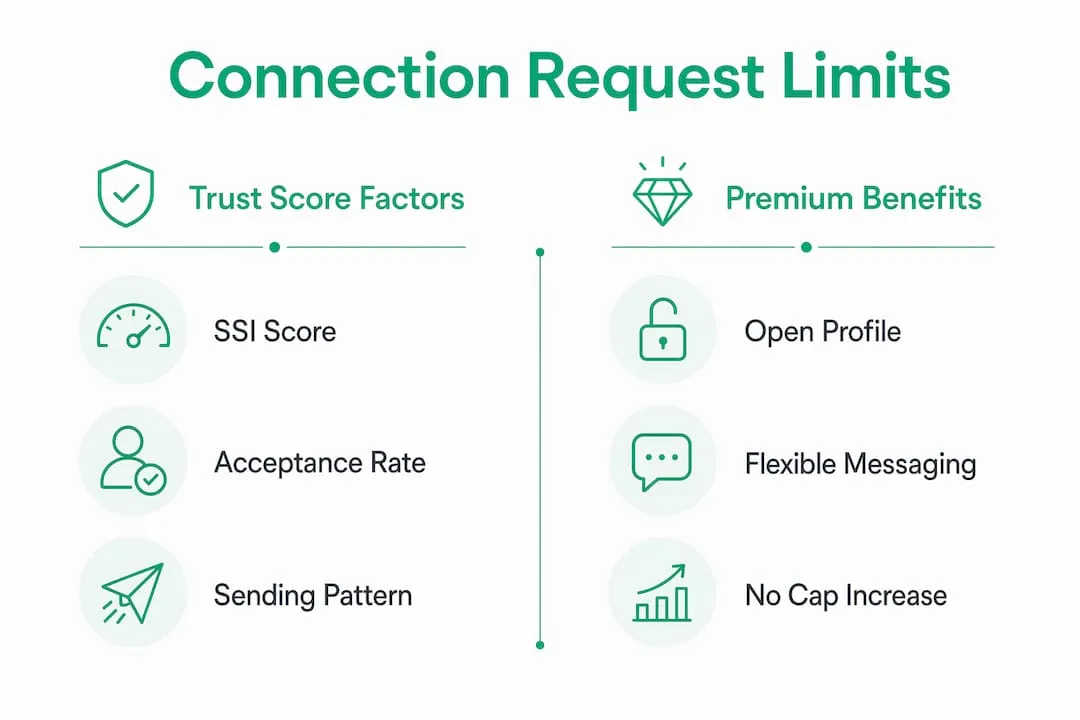
LinkedIn’s Trust Score is the algorithm that sets your personal weekly connection request ceiling. No single universal limit exists; instead, LinkedIn assigns a range of 50–200 requests per week based on account health signals it monitors continuously.
The key inputs LinkedIn weighs include:
- Acceptance rate: The percentage of your sent requests that recipients accept. LinkedIn treats a low acceptance rate as a signal that your outreach is irrelevant or unwanted.
- Reply rate: How often your messages generate responses. High reply rates signal genuine engagement.
- Account age: New accounts under three months are capped at 50–80 requests per week. Mature accounts with strong histories can reach 200.
- Pending invite queue: The number of unanswered requests sitting in your outbox. A bloated queue signals spam-like behavior.
- Organic engagement: Likes, comments, and shares on your posts signal that you are an active, legitimate member of the platform.
High SSI scores above 65 combined with acceptance rates above 40% correlate directly with weekly limits in the 150–200 range. That is the ceiling most experienced sales reps can realistically reach without automation tools.
The timing mechanic matters too. LinkedIn enforces limits on a rolling 7-day cycle, not a fixed Monday-to-Sunday reset. Each request you send “rolls off” exactly seven days after it was sent, freeing up one slot at a time. This means you cannot batch 100 requests on Monday and expect a clean slate the following Monday. Your available quota replenishes gradually throughout the week.
Pro Tip: Check your SSI score at linkedin.com/sales/ssi. It updates daily and gives you a direct read on which Trust Score components need attention before you push outreach volume.
What does LinkedIn premium actually do for connection requests?
LinkedIn Premium does not increase your weekly connection request cap on its own. This is the most common misconception among sales professionals upgrading their accounts expecting immediate outreach volume gains.
What Premium does change is the quality and flexibility of each request you send. Paid plans remove the restrictive monthly cap on personalized connection notes that free accounts face. Free users are limited to roughly 5–20 personalized notes per month and a 200-character limit per note. Premium users send unlimited personalized notes with a 300-character limit. That extra 100 characters is enough to include a specific reference to a prospect’s recent post or company milestone, which directly improves acceptance rates and, by extension, your Trust Score.

Premium also unlocks the Open Profile feature. Open Profile lets you message other Premium members directly without sending a connection request or spending an InMail credit. For sales reps targeting other Premium subscribers, this is a genuine bypass of the weekly limit for that subset of contacts.
Here is a clear comparison of what changes and what does not across account types:
| Feature | Free Account | LinkedIn Premium | Sales Navigator |
|---|---|---|---|
| Weekly connection requests | 50–100 (Trust Score dependent) | 50–200 (Trust Score dependent) | 200–250 (mature, high SSI) |
| Personalized note character limit | 200 characters | 300 characters | 300 characters |
| Monthly personalized notes | 5–20 (capped) | Unlimited | Unlimited |
| InMail credits per month | 0 | 5–15 (plan dependent) | 50 (Core plan) |
| Open Profile messaging | No | Yes | Yes |
| Commercial use search limit | Yes (restricted) | Partially lifted | Fully lifted |
Pro Tip: If your prospect list is heavily weighted toward decision-makers who hold Premium accounts, activating Open Profile and messaging them directly can double your effective weekly outreach without touching your connection request quota.
How to maximize your connection requests safely
Increasing your weekly limit is a behavioral game, not a billing one. The following steps build the Trust Score signals LinkedIn rewards with higher caps.
-
Keep your acceptance rate above 40%. This is the single most impactful metric. If your rate drops below this threshold, LinkedIn’s algorithm interprets your outreach as low-quality and tightens your limit. Audit your prospect targeting before volume becomes a problem.
-
Spread requests across the week naturally. Sending more than 120 requests per week significantly increases your restriction risk. A study of 200 accounts found that exceeding 150 per week pushed restriction rates above 80%. Send 15–20 requests per day rather than 100 on a single day.
-
Manage your pending invite queue aggressively. Keeping pending invitations under 500 is critical. Once your queue exceeds this threshold, LinkedIn can block new requests entirely. Withdraw invites older than 3–4 weeks that have not been accepted. Note that withdrawing old invites does not restore your weekly quota, but it does prevent a hard block.
-
Personalize every note with a specific reference. Generic notes like “I’d like to add you to my network” generate low acceptance rates. Reference a specific post, shared connection, or company event. This takes 30 extra seconds per request and meaningfully improves your acceptance rate over time.
-
Build your SSI score deliberately. LinkedIn’s SSI measures four pillars: establishing your professional brand, finding the right people, engaging with insights, and building relationships. Maintaining a high SSI and acceptance rate is more effective at increasing your weekly limit than upgrading your subscription tier alone. Post original content weekly, engage with your feed daily, and use LinkedIn’s search tools actively.
-
Use LinkedIn’s advanced search filters to target precisely. Sending requests to highly relevant prospects improves your acceptance rate faster than any other single action. Narrow your audience by industry, seniority, geography, and company size before you send a single invite.
LinkedIn’s enforcement focuses on natural, consistent sending patterns rather than raw volume. An account sending 80 requests per week with a 55% acceptance rate will consistently outperform one sending 150 requests with a 20% acceptance rate, both in limit headroom and in actual pipeline results.
Free, premium, and sales navigator: which limit wins?
The account tier comparison is straightforward once you separate what each plan actually controls. Sales Navigator subscriptions do not increase connection request limits directly, but they provide advantages that indirectly push your ceiling higher. Advanced search filters help you target prospects more precisely, which improves acceptance rates, which raises your Trust Score, which increases your weekly cap. The mechanism is indirect but real.
Sales Navigator also lifts the commercial use limit that restricts how many profiles free and basic Premium users can view per month. For high-volume prospectors, hitting that search wall is often the first constraint they encounter, before they ever reach their connection request ceiling. Lifting it unlocks the top of the funnel so your outreach pipeline stays full.
Premium and Sales Navigator’s real ROI lies in search capability and commercial use limit removal, not in raw connection request volume. Sales professionals who understand this invest in improving their behavioral metrics alongside their subscription tier, rather than expecting the upgrade alone to solve their outreach constraints.
For teams evaluating which plan to choose, the Sales Navigator plans comparison at Salesnavsplit breaks down the feature differences clearly across Core, Advanced, and Advanced Plus tiers.
Key takeaways
The LinkedIn Premium connection request limit is governed by your Trust Score, and improving that score through behavioral consistency delivers more weekly capacity than any subscription upgrade alone.
| Point | Details |
|---|---|
| Limits are dynamic, not fixed | Weekly caps range from 50–200 based on Trust Score, not subscription tier. |
| Premium improves note quality, not raw volume | Paid plans unlock unlimited personalized notes with 300-character limits, boosting acceptance rates. |
| Pacing prevents restrictions | Sending over 120 requests per week raises restriction risk significantly; spread sends daily. |
| Pending queue management is critical | Keep pending invites under 500 to avoid a hard block on new connection requests. |
| SSI score is your real lever | An SSI above 65 with a 40%+ acceptance rate unlocks the highest weekly sending capacity. |
The metric most sales reps ignore until it’s too late
I have watched sales professionals spend real money upgrading to Premium or Sales Navigator expecting their outreach numbers to jump overnight. They almost always feel let down in the first two weeks. The reason is simple: they upgraded their plan without upgrading their behavior.
The accounts I have seen consistently reach 150–200 weekly requests are not the ones with the most expensive subscriptions. They are the ones obsessing over acceptance rates. They write specific, researched notes. They withdraw stale invites every Friday. They post on LinkedIn twice a week not because they want followers, but because organic engagement feeds the Trust Score algorithm.
The uncomfortable reality is that LinkedIn built this system to reward members who behave like humans, not like automated outreach machines. The moment you start treating connection requests as a volume game, the algorithm tightens your limit. The moment you treat each request as a conversation starter worth personalizing, your metrics improve and your ceiling rises.
My advice: before you touch your subscription tier, spend two weeks cleaning up your pending queue, improving your note quality, and checking your SSI score daily. You will likely find your limit increases without spending an extra dollar. Then, if you need advanced search and commercial use limit removal, upgrade to Sales Navigator with a clear understanding of what you are actually buying.
For teams serious about lead generation on LinkedIn, the behavioral foundation always comes first. The tools amplify what is already working.
— Toinon
Get sales navigator at half the price through Salesnavsplit
Understanding your connection request limits is step one. Having the right tools to act on that knowledge is step two.
Salesnavsplit provides official LinkedIn Sales Navigator seats at up to 50% off standard pricing. These are genuine, LinkedIn-compliant licenses sourced through verified reseller partnerships in the US and Europe, not shared credentials or workarounds. Seat activation takes 24–48 hours, billing runs through Stripe, and every license is fully protected. For sales professionals who need advanced search filters, lifted commercial use limits, and higher outreach capacity, this is the most cost-effective path to a Sales Navigator license that actually works within LinkedIn’s rules.
FAQ
Does LinkedIn premium increase my weekly connection request limit?
LinkedIn Premium does not directly raise your weekly connection request cap. Your limit is set by your Trust Score, which reflects your acceptance rate, SSI score, and account history.
How many connection requests can i send per week on LinkedIn?
Weekly limits range from 50–200 depending on your Trust Score. New accounts start at 50–80 per week, while mature accounts with high SSI scores and strong acceptance rates can reach 200.
What happens if i exceed my LinkedIn connection request limit?
LinkedIn will restrict your ability to send new invites. Accounts sending over 150 requests per week face restriction rates above 80%, based on a study of 200 accounts.
How does the open profile feature help with connection limits?
Open Profile allows Premium members to message other Premium users directly without using a connection request or InMail credit, effectively bypassing the weekly cap for that group of contacts.
Does sales navigator give you more connection requests than premium?
Sales Navigator does not directly increase connection request limits, but mature accounts with high SSI scores using Sales Navigator can reach 200–250 weekly requests. The real advantage is advanced search and lifted commercial use limits, which improve targeting quality and acceptance rates over time.