
Sales Navigator 2 Months Free: Full 2026 Guide
Sales Navigator 2 Months Free: Full 2026 Guide
TL;DR:
- The 2-month free trial of LinkedIn Sales Navigator is available exclusively through referral links from active subscribers. It offers full Core plan features for 60 days, but requires a credit card and careful planning to maximize value. Most users overlook this option, risking unnecessary charges if they do not set timely cancellation reminders.
LinkedIn Sales Navigator’s 2-month free trial is a referral-based offer that doubles the standard 30-day trial, giving sales professionals 60 days of full Core plan access at no cost. Most reps never hear about it because LinkedIn does not advertise it publicly. You need a referral link from an active Sales Navigator subscriber to unlock it. That link leads to a signup page showing “2 months free” instead of the usual “1 month free.” This guide covers exactly how to get that link, what you receive during the trial, and how to turn 60 days into measurable pipeline.
Does sales navigator offer a 2-month free trial?
The standard Sales Navigator free trial lasts 30 days and is available to any new user directly through LinkedIn. The 60-day version is different. It requires a referral link generated by an active subscriber, and it is not listed anywhere on LinkedIn’s public pricing page. That distinction matters because most sales professionals assume the standard trial is their only option.
The referral system works through LinkedIn’s profile settings. Active subscribers navigate to the “Referrals” section and generate a unique link tied to their account. That link is then shared with a contact who has not previously held a paid Sales Navigator subscription. When the contact clicks the link and signs up, they see the extended offer rather than the default one.
Both trials include identical features. The difference is purely duration. The table below shows the key distinctions at a glance.
| Feature | 30-Day Trial | 60-Day Trial |
|---|---|---|
| Duration | 30 days | 60 days |
| Access level | Core plan | Core plan |
| InMail credits | 50/month | 50/month |
| Advanced search filters | Yes | Yes |
| CRM integration | Yes | Yes |
| How to access | Direct LinkedIn signup | Referral link required |
| Eligibility restriction | Once per 12 months | Once per 12 months |
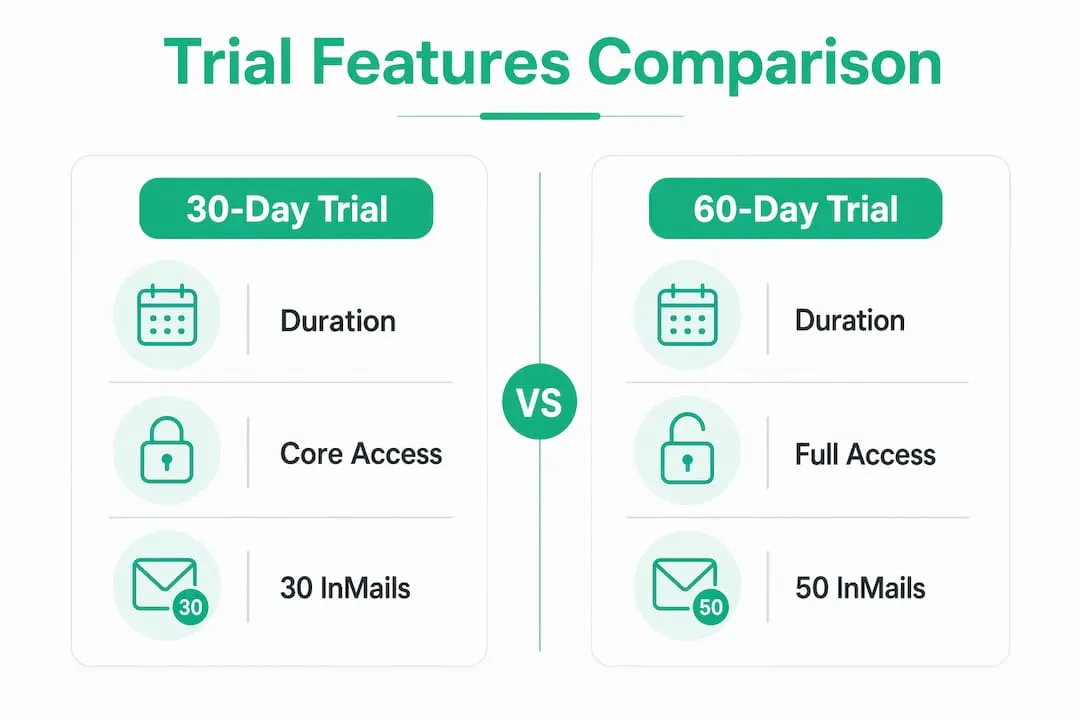
One restriction applies to both versions. LinkedIn tracks trial eligibility per account, not per email address. If you had a paid subscription or a free trial within the past 12 months, you are blocked from starting a new one. Creating an alternate LinkedIn account to get around this violates LinkedIn’s terms of service.
How to get the sales navigator 2-month trial
Getting the extended trial comes down to one thing: finding someone who already pays for Sales Navigator and asking them to generate a referral link. Here is the exact process.
- Identify an active Sales Navigator subscriber. Check your LinkedIn network for connections who work in sales, recruiting, or B2B business development. These roles are the most likely to hold active licenses. A direct message asking for a referral link takes less than 60 seconds to send.
- Ask them to generate your referral link. The subscriber goes to their Sales Navigator account settings, finds the “Referrals” section, and generates a unique link. Only active subscribers with qualifying plans can create these links, and each link is tied to both the referrer’s account and the recipient’s LinkedIn account.
- Click the link and verify the offer. Before entering any payment information, confirm the signup page displays “2 months free.” If it shows “1 month free,” the link did not apply correctly or you may already be ineligible.
- Enter a valid credit card. A credit card is required to activate any Sales Navigator trial. No charge occurs during the trial period, but LinkedIn stores the card for automatic billing when the trial ends.
- Set your cancellation reminder immediately. Do not wait. Open your calendar right now and set a reminder for day 55. LinkedIn rarely sends reminder emails before trial conversion, so the responsibility falls entirely on you.
- Confirm your account is active. Log into Sales Navigator and verify that your InMail credits, lead lists, and search filters are all accessible. If anything looks off, contact LinkedIn support before day 3.
Pro Tip: Set two calendar reminders: one on day 55 to review whether you want to continue, and one on day 58 as a hard deadline to cancel if you decide not to. Practitioners specifically recommend reminders on day 55 for the 60-day trial to avoid accidental charges.
What features do you get during the trial?
The 60-day trial provides full Sales Navigator Core access, which is the same plan that costs $119.99 per month after the trial ends. You are not getting a stripped-down preview. You get the complete feature set.
Here is what that includes:
- Advanced search filters. Sales Navigator’s search goes far beyond standard LinkedIn. You can filter by seniority level, company headcount, industry, geography, job change recency, and more. This is the feature that separates it from a free LinkedIn account. Use it to build targeted prospect lists from day one.
- 50 InMail credits per month. InMail lets you message anyone on LinkedIn, even people outside your network. You receive 50 credits each month of the trial, giving you 100 total over 60 days. Unused credits do not roll over after the trial ends.
- Lead and account lists. You can save individual prospects as leads and organize target companies as accounts. Sales Navigator then surfaces updates when those people change jobs, get promoted, or post content. That context makes outreach far more relevant.
- Real-time alerts. The platform notifies you when a saved lead or account triggers a signal, such as a funding announcement or a leadership change. These signals are the fastest way to identify a warm outreach moment.
- CRM integration. Sales Navigator syncs with Salesforce and HubSpot, pushing lead activity and notes directly into your existing workflow. This prevents prospecting data from living only inside LinkedIn.
The combination of these tools supports a complete B2B prospecting cycle. You can identify a prospect, research their company, send a personalized InMail, and log the interaction in your CRM without leaving the platform.
How to maximize the 60-day trial period

Sixty days sounds like a long time. It is not, if you treat it casually. Experts recommend treating the trial as an evaluation sprint with defined goals, not as a period for casual exploration. Because the trial is limited to once every 12 months per account, you only get one shot at this.
Follow these strategies to extract real value:
- Define your goals before day one. Decide in advance how many leads you want to contact, what response rate you are targeting, and which accounts you want to penetrate. Vague goals produce vague results.
- Build your lead lists in the first week. Use the advanced sales filters to create a prioritized list of 100–200 prospects before you send a single message. Front-loading research means you spend the rest of the trial on outreach, not setup.
- Use InMail credits strategically. Do not spray 50 InMails at random contacts in week one. Segment your list by warmth and relevance. Reserve InMail for prospects who are not connected to you. Use connection requests and regular messages for everyone else.
- Never share your account. Sharing a single Sales Navigator seat among multiple users risks account suspension. LinkedIn’s detection systems flag unusual login patterns. Each user needs their own authenticated license.
- Track your outreach metrics weekly. Log your InMail response rates, connection acceptance rates, and meetings booked. This data tells you whether Sales Navigator is generating ROI before you commit to a paid plan.
- Decide on day 45, not day 59. Give yourself two weeks to evaluate your results and make a deliberate decision about continuing. Waiting until the last minute leads to either accidental charges or a rushed cancellation.
Pro Tip: Prepare your prospecting lists and outreach scripts before activating the trial. Sales professionals who treat the trial as a sprint with pre-built lists consistently report better results than those who start from scratch after activation.
Key takeaways
The 60-day Sales Navigator trial is the most cost-effective way to evaluate LinkedIn’s full prospecting suite, but it requires a referral link, a credit card, and a structured plan to deliver real results.
| Point | Details |
|---|---|
| Referral link required | The 2-month trial is not public; request a link from an active Sales Navigator subscriber. |
| Full Core plan access | Both trial versions include 50 InMail credits, advanced filters, and CRM sync. |
| One trial per 12 months | LinkedIn tracks eligibility by account; alternate accounts violate terms of service. |
| Set cancellation reminders | LinkedIn rarely sends billing alerts; set a calendar reminder for day 55 of the trial. |
| Plan before you activate | Build prospect lists and outreach scripts before starting the trial to maximize all 60 days. |
The referral trial is underused for a reason
Most sales reps I talk to have never heard of the 60-day option. That is not an accident. LinkedIn has no incentive to advertise a longer free period when the standard 30-day trial already converts well. The referral system exists because it benefits LinkedIn too: active subscribers become advocates, and new users who get more time are more likely to convert to paid plans.
The uncomfortable truth is that most people who do get the extended trial still waste it. They spend the first two weeks poking around the interface, send a handful of InMails without a clear strategy, and then either forget to cancel or decide to subscribe without knowing whether it actually moved the needle.
The trial is genuinely valuable, but only if you treat it like a structured sales experiment. I have seen reps book 15 qualified meetings in 60 days using nothing but Sales Navigator’s advanced filters and a tight InMail sequence. I have also seen reps finish the trial with nothing to show for it because they never defined what success looked like.
One more thing worth knowing: the $119.99 per month price tag after the trial is real, and it adds up fast. Before you let the trial convert to a paid subscription, check whether a discounted Sales Navigator license through a verified reseller makes more financial sense than paying full retail. For smaller teams and individual reps, the savings are significant.
— Toinon
Continue with sales navigator after the trial
When the trial ends, the Core plan bills at $119.99 per month. For solo reps and small B2B teams, that cost adds up quickly. Salesnavsplit provides official Sales Navigator seats at up to 50% off standard pricing, sourced through verified reseller partnerships in the US and Europe. Every seat is a genuine LinkedIn license, fully compliant with LinkedIn’s terms of service, with activation in two business hours European time and invoicing through Stripe. If the trial proved Sales Navigator’s value for your pipeline, Salesnavsplit is the most direct way to keep that access without paying full retail. Explore the available Sales Navigator plans to find the right fit for your team size and budget.
FAQ
How do i get the sales navigator 2-month free trial?
You need a referral link from an active Sales Navigator subscriber. The subscriber generates the link from their account’s “Referrals” section, and you use it to sign up for a 60-day trial instead of the standard 30-day offer.
Does the 2-month trial require a credit card?
Yes. A valid credit card is required to activate the trial. No charge occurs during the trial period, but automatic billing starts on day 61 if you do not cancel before the trial ends.
Can i use the sales navigator free trial more than once?
No. LinkedIn restricts free trials to one per 12 months per LinkedIn account. Attempting to use a second account to bypass this restriction violates LinkedIn’s terms of service.
What features are included in the 2-month trial?
The trial provides full Sales Navigator Core access, including 50 InMail credits per month, advanced search filters, lead and account lists, real-time alerts, and CRM integration with Salesforce and HubSpot.
What happens if i miss the cancellation deadline?
LinkedIn’s subscription auto-renews at the end of the trial with no guaranteed reminder email. If you miss the deadline, you are billed the full Core plan rate. Set a calendar alert on day 55 to give yourself time to cancel or decide to continue.