
Authentication in Online Sales Services: 2026 Guide
Authentication in Online Sales Services: 2026 Guide
TL;DR:
- Effective online sales authentication verifies user identity at multiple touchpoints to prevent fraud and data breaches. Implementing platform-specific, risk-based methods like MFA, passkeys, 3-D Secure, and behavioral analytics enhances security while maintaining a smooth user experience. Properly capturing and storing authentication results, especially ECI codes for 3DS, shifts fraud liability to the issuer, protecting merchants financially.
Authentication in online sales services is the process of verifying user identity at multiple points throughout the transaction lifecycle, protecting both buyers and sellers from fraud, account takeovers, and data breaches. Platforms like Shopify, Microsoft Dynamics 365, and NetSuite each implement this differently, and the gap between a secure checkout and a compromised one often comes down to which methods you deploy and where. This guide covers the core authentication methods for online sales, platform-specific constraints, best practices for sales security, and the financial stakes tied to getting it right.
What authentication methods are used in online sales services?
Authentication in online sales services goes far beyond a username and password at login. Authentication occurs at multiple points in the customer journey, including account creation, login, support interactions, and before sensitive actions like payment or address changes. Each touchpoint carries a different risk level, and your method should match that risk.

Multi-factor authentication (MFA) remains the baseline standard. It combines something the user knows (a password), something they have (a phone or hardware key), and something they are (a fingerprint or face scan). Shopify recommends combining passive behavioral signals with step-up verification for high-risk actions, rather than applying maximum friction at every step.
Passwordless methods, including passkeys and biometrics, are gaining ground fast. They eliminate the phishing risk tied to passwords entirely, since there is no credential to steal. On mobile, passkeys reduce checkout time and abandonment rates, which matters directly to your conversion funnel.
3-D Secure (3DS) is the dominant protocol for card-not-present payments. 3DS authenticates the cardholder before payment approval, often transparently through behavioral analysis, but may trigger a one-time passcode, banking app approval, or biometric check when risk signals are elevated. This is the method that also determines fraud liability, which is covered in detail later.
Behavioral biometrics and device fingerprinting work passively in the background. They analyze typing speed, mouse movement, and device characteristics to flag anomalies without asking the user to do anything. These signals feed into risk-based authentication engines and reduce the need for active challenges.
OpenID Connect (OIDC) is the federated identity protocol underlying most modern sales platforms. It allows identity providers like Google or Microsoft Entra ID to authenticate users and pass verified identity tokens to your sales application.
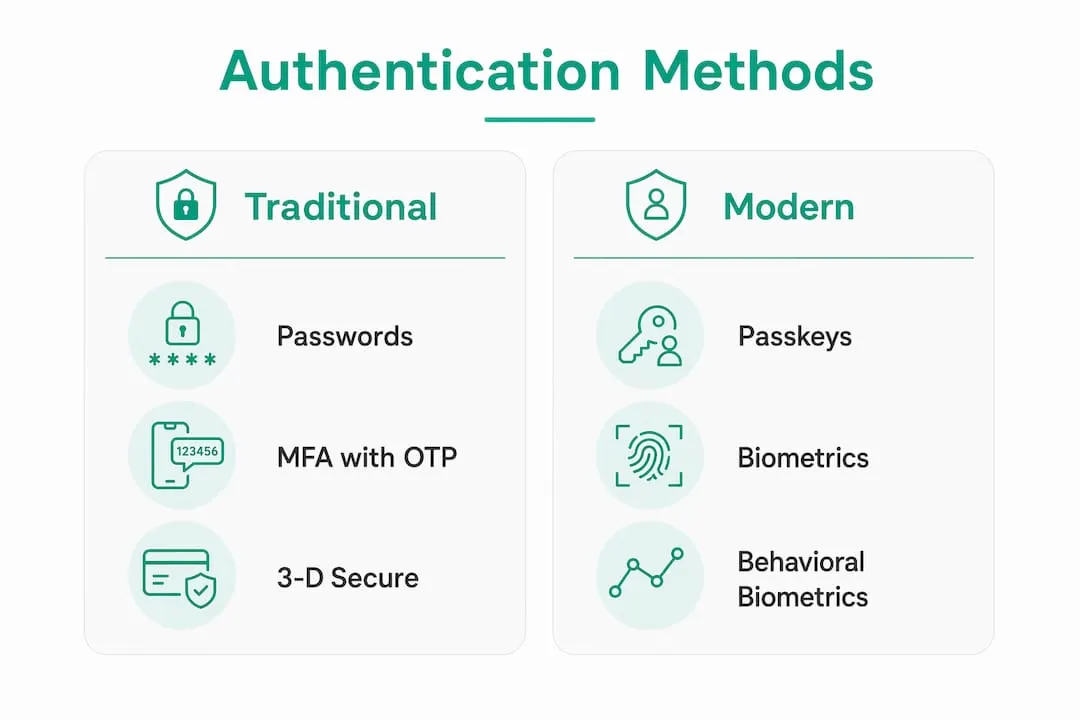
| Method | Primary use case | Friction level |
|---|---|---|
| MFA with OTP | Login, account changes | Medium |
| Passkeys / biometrics | Mobile checkout, repeat customers | Low |
| 3-D Secure | Card-not-present payments | Low to medium |
| Behavioral biometrics | Passive fraud detection | None |
| OpenID Connect | Federated enterprise login | Low |
Pro Tip: Never apply your strongest authentication method uniformly across all actions. Reserve step-up verification for genuinely high-risk moments like payment submission or shipping address changes. Blanket MFA on every page visit trains customers to ignore prompts, which is the opposite of security.
How do authentication flows differ across Shopify, Dynamics 365, and NetSuite?
Platform choice shapes your authentication options more than most sales teams realize. Each platform has specific supported flows, and working against those constraints creates broken experiences or security gaps.
Shopify treats authentication as a multi-point strategy rather than a single gate. Its architecture supports passkey implementations, behavioral signals, and step-up verification at checkout. The platform’s guidance is explicit: implementing MFA only at login is insufficient. Sensitive actions like payment and account modification need their own verification checkpoints. Shopify also supports social login via OIDC-compatible providers, which reduces friction for repeat buyers.
Microsoft Dynamics 365 Commerce uses OpenID Connect as its authentication foundation, but with critical limitations. Authorization code and On-Behalf-Of flows are not supported for e-commerce site user authentication. This is a common trap for development teams building headless commerce on Dynamics 365. If you configure an unsupported OIDC flow, user identity propagation breaks silently, and customers either cannot log in or lose their session mid-checkout. Understanding these platform-specific flow limitations before you build is non-negotiable.
NetSuite handles credit card payer authentication through a redirect model. The customer is sent to an external payer authentication site, completes verification, and returns to the checkout flow. NetSuite records the authentication status on the sales order as successful, failed, or skipped. That status field is not cosmetic. It feeds directly into fraud diagnostics and determines whether you have evidence to support a chargeback dispute.
Common pitfalls across all three platforms include:
- Configuring unsupported OIDC flows that break identity propagation in headless builds
- Ignoring skip and failure rates on payer authentication, which signals checkout friction
- Failing to store authentication result codes from 3DS, forfeiting liability shift protections
- Not building fallback flows for private browsing sessions, where stored credentials are unavailable
Pro Tip: Before going live on any sales platform, map every authentication touchpoint against the platform’s supported flows. A 30-minute architecture review prevents weeks of debugging broken login states in production.
What are the best practices for balancing security and user experience?
The goal is not maximum security. The goal is appropriate security at the right moment, with minimal disruption to the buyer. These practices apply whether you are running a Shopify storefront, a Dynamics 365 Commerce deployment, or a custom-built sales platform.
-
Apply step-up authentication selectively. Trigger stronger verification only for high-risk actions: payment submission, shipping address changes, password resets, and support requests involving account data. Routine browsing and product searches do not need authentication challenges.
-
Prioritize passwordless on mobile. Repeat customers on mobile devices convert faster with passkeys or biometric login than with password fields. The TLS/HTTPS certificate layer secures the channel; passkeys secure the identity. Together, they cover both server and user authentication without adding friction.
-
Track authentication outcome rates. Monitor success, failure, and skip rates for every authentication checkpoint. Tracking payer authentication outcomes is the only way to diagnose whether a drop in conversion is caused by a broken flow, excessive friction, or a genuine fraud spike.
-
Consolidate sessions to reduce MFA fatigue. If a customer authenticates at login, do not re-challenge them for every subsequent action within the same session unless risk signals change. Use session tokens and behavioral signals to maintain verified state across the checkout flow.
-
Make account recovery harder than login. Password reset and account recovery flows are the most abused entry points for account takeover. Require identity verification for e-commerce account recovery that is at least as strong as your highest-risk transaction checkpoint.
-
Build fallback mechanisms for private browsing. Private browsing modes limit stored data access, which breaks payment handler authentication flows that rely on cached credentials. Design a re-authentication path that works without stored state, so customers in private sessions can still complete purchases.
Pro Tip: Analyze your authentication funnel the same way you analyze your sales funnel. If 15% of users abandon at the 3DS step, that is a conversion problem with a security cause. Treat it as both.
How does authentication affect fraud liability in online sales?
This is where authentication stops being a technical concern and becomes a financial one. The outcome of a 3DS authentication event determines who absorbs the cost of a fraudulent transaction.
Successful 3DS authentication shifts fraud liability from the merchant to the card issuer. The cardholder’s bank verified the identity and approved the transaction. If fraud occurs after that verification, the bank covers the chargeback. Without successful authentication, the merchant absorbs the loss.
The mechanism is the Electronic Commerce Indicator (ECI) code, a value returned by the 3DS process that records the authentication outcome. ECI values map directly to liability shift status, and you must capture and store these codes on every transaction. Failing to store them means you cannot prove authentication occurred, even if it did.
| ECI value | Authentication outcome | Liability |
|---|---|---|
| 05 (Visa) / 02 (Mastercard) | Full authentication completed | Shifts to issuer |
| 06 (Visa) / 01 (Mastercard) | Attempted, issuer not enrolled | Partial shift |
| 07 (Visa) / 00 (Mastercard) | Authentication failed or not attempted | Merchant retains liability |
Stand-in processing applies when the card issuer or the 3DS protocol is temporarily unavailable. In these cases, a network or processor steps in to complete the authentication decision. Liability shift rules still apply, but the outcome depends on the stand-in entity’s decision, not the issuer’s.
Merchants who skip 3DS or fail to store authentication result codes are not just taking a security risk. They are accepting financial liability for every fraudulent transaction that follows, with no recourse against the card network.
The practical implication: treat authentication result storage as a compliance requirement, not an optional logging feature. Every sales order processed through a card-not-present channel needs a recorded ECI code and authentication status before the transaction closes.
Key takeaways
Authentication in online sales services requires multi-point identity verification, platform-aligned flows, and stored authentication evidence to protect transactions and preserve fraud liability protections.
| Point | Details |
|---|---|
| Multi-point authentication | Apply verification at login, checkout, and account changes, not just at the front door. |
| Platform flow constraints | Dynamics 365 Commerce does not support authorization code or On-Behalf-Of OIDC flows for e-commerce users. |
| 3DS liability shift | Capture and store ECI codes on every card-not-present transaction to preserve chargeback protections. |
| Passwordless reduces risk | Passkeys and biometrics eliminate phishing vectors and cut mobile checkout friction simultaneously. |
| Fallback flows matter | Private browsing breaks stored credential flows; design re-authentication paths that work without cached state. |
Why most sales teams are solving authentication backwards
I have watched sales teams spend months hardening their login page while leaving checkout completely unprotected. It is the wrong priority. Login is the most visible authentication point, so it gets the most attention. But fraud does not happen at login. It happens at payment, at address change, at the support ticket that asks to reset an email address.
The shift toward secure sales prospecting and account protection is real, but most implementations are still reactive. Teams add MFA after a breach, not before one. They discover their Dynamics 365 OIDC flow is broken when customers start calling support, not during QA. They find out their 3DS codes were never stored when they lose their first chargeback dispute.
The teams getting this right in 2026 share one habit: they treat authentication as a funnel metric, not a security checkbox. They measure skip rates, failure rates, and abandonment at every verification step. They know that a 3DS challenge with a 20% abandonment rate is costing them more in lost revenue than the fraud it prevents. And they tune accordingly.
Passwordless and risk-based authentication are not future technologies. They are available today on every major sales platform. The only reason most businesses have not adopted them is inertia. If you are still relying on passwords and a single MFA prompt at login, you are behind. Not because the threat has changed, but because the tools to address it have gotten significantly better and easier to deploy.
— Toinon
Secure your sales platform with Salesnavsplit
If you are building a secure sales operation, the tools you use need to be as protected as the processes you put around them. Salesnavsplit provides official LinkedIn Sales Navigator seats at up to 50% off standard pricing, sourced through verified reseller partnerships in the US and Europe. Every seat is genuine, compliant with LinkedIn’s terms of service, and activated within two business hours European time.
Payments process through Stripe with official invoicing, and account setup uses Google authentication to eliminate credential risks from day one. For sales teams that care about protecting sales accounts and keeping their prospecting tools secure, Salesnavsplit delivers licensed access without the exposure that comes from unverified third-party sources.
FAQ
What is authentication in online sales services?
Authentication in online sales services is the process of verifying user identity at critical points in the transaction lifecycle, including login, checkout, and account changes. It uses methods like MFA, passkeys, biometrics, and 3-D Secure to confirm that buyers and account holders are who they claim to be.
What is the most secure authentication method for online payments?
3-D Secure combined with behavioral biometrics provides the strongest protection for card-not-present payments. 3DS authenticates the cardholder before payment approval and shifts fraud liability to the card issuer when authentication is fully completed and the ECI code is stored.
How does 3-D Secure affect chargeback liability?
Successful 3DS authentication shifts fraud chargeback liability from the merchant to the card issuer. The liability shift depends on the Electronic Commerce Indicator code returned by the authentication process, which must be captured and stored on the transaction record.
Why do authentication flows break in Dynamics 365 Commerce?
Authorization code and On-Behalf-Of OIDC flows are not supported for e-commerce user authentication in Dynamics 365 Commerce. Using these unsupported flows causes broken identity propagation, which results in failed logins or dropped sessions during checkout.
What happens when a customer skips payer authentication in NetSuite?
NetSuite records the authentication status as skipped on the sales order, which means no verified authentication evidence exists for that transaction. Skipped authentication increases fraud exposure and removes the merchant’s ability to claim liability shift protections in a chargeback dispute.