
Step-by-step LinkedIn outreach: win more B2B leads
Step-by-step LinkedIn outreach: win more B2B leads
TL;DR:
- Effective LinkedIn outreach relies on proper preparation, personalization, and avoiding over-automation.
- Combining manual effort with AI tools enhances response rates while minimizing account bans.
- Tracking key metrics and maintaining genuine engagement are essential for sustainable success.
LinkedIn outreach is one of the highest-leverage activities in B2B sales, yet most reps blow it within the first message. Accounts get restricted, connection requests go ignored, and pipelines stay empty despite hours of effort. The difference between reps who consistently book meetings and those who don’t usually comes down to process, not personality. This guide walks you through exactly what to prepare, how to execute, what mistakes to sidestep, and how to measure results, so you can run outreach that actually converts without putting your account at risk.
Table of Contents
- What you need before starting LinkedIn outreach
- Step-by-step LinkedIn outreach process for sales success
- Common outreach mistakes and how to avoid them
- Tracking, measuring, and verifying your LinkedIn outreach results
- A smarter philosophy for LinkedIn outreach in 2026
- Boost your LinkedIn outreach with the right tools and pricing
- Frequently asked questions
Key Takeaways
| Point | Details |
|---|---|
| Hybrid approach is safest | Mixing manual personalization with some AI help avoids bans and boosts acceptance rates. |
| Warm up before outreach | Engage with prospects’ content first to increase your connection acceptance by up to 40 percent. |
| Invest wisely in tools | Start with free LinkedIn features and scale to Sales Navigator as your B2B pipeline evolves. |
| Test and adapt weekly | Regularly review metrics and refine your messaging to drive higher sales conversions. |
What you need before starting LinkedIn outreach
Before you send a single connection request, you need the right foundation. Think of this like prepping a job site before construction. Skipping setup means rework later, and in LinkedIn outreach, rework often means a restricted account or a cold pipeline.
Here are the minimum requirements every rep needs before launching outreach:
- A complete LinkedIn profile with a professional photo, clear headline, and a summary written for your buyer, not your resume
- A verified business email tied to your LinkedIn account for account recovery and credibility
- A defined target persona with industry, company size, seniority level, and pain points mapped out
- A content engagement habit where you like, comment on, and share posts from target accounts before reaching out
For teams serious about scale, LinkedIn Sales Navigator adds advanced search filters, lead recommendations, and account alerts that a basic account simply cannot match. At standard pricing it runs around $99 per month per seat, which is a real barrier for small teams and solo reps.
| Tool | Cost | Best for |
|---|---|---|
| LinkedIn Free | $0 | Early-stage testing, small lists |
| LinkedIn Premium | ~$40/mo | Light prospecting, InMail credits |
| Sales Navigator | ~$99/mo | Advanced filters, account tracking |
| Discounted Sales Navigator seat | ~$50/mo | Teams needing scale without full cost |
One stat worth taking seriously: automation-only outreach carries a 23% ban risk within 90 days. That is nearly one in four accounts. The safer path is a hybrid manual and AI-assisted workflow, and research confirms that content engagement before outreach boosts connection acceptance rates by 30 to 40 percent.
Pro Tip: Before contacting any Tier 1 prospect, spend 5 to 10 minutes reviewing their recent posts, company news, and LinkedIn activity. One specific reference in your message is worth more than a dozen generic compliments.
Step-by-step LinkedIn outreach process for sales success
Once your tools and profile are ready, execution comes down to a repeatable sequence. Here is the process that consistently produces results without triggering LinkedIn’s spam filters.
- Warm up the target. Engage with their content at least two to three times over one to two weeks before sending a connection request. A thoughtful comment on their post puts your name in front of them before you ever ask for anything.
- Send a personalized connection request. Keep it under 300 characters. Reference something specific, a post they wrote, a company milestone, or a shared connection. Never pitch in the connection request.
- Wait for acceptance, then deliver value first. Your opening message after acceptance should give something useful, a relevant article, a quick insight, or a specific observation about their business. Do not ask for a meeting yet.
- Follow up with a soft ask. After one or two value-based exchanges, introduce the reason you reached out and propose a low-commitment next step like a 15-minute call.
- Multi-thread key accounts. For high-value targets, reach out to 6 to 10 stakeholders across the same company. Different roles see different angles of your value proposition.
- Use AI to assist, not replace. AI tools can help draft templates and surface insights, but manual personalization and hybrid workflows consistently reduce risk and improve response rates.
| Outreach type | Acceptance rate | Reply rate | Ban risk |
|---|---|---|---|
| Full automation | 18% | 4% | High (23% in 90 days) |
| Manual only | 38% | 12% | Very low |
| Hybrid manual/AI | 42% | 16% | Low |
For Tier 1 prospects, invest full manual effort. For Tier 2, use templates but error-check every message before sending. You can explore advanced outreach strategies to see how Sales Navigator’s features support this tiered approach.

Pro Tip: Multi-threading works best when each stakeholder receives a message tailored to their specific role. The CFO cares about cost, the VP of Sales cares about pipeline, and the end user cares about ease of use.
Common outreach mistakes and how to avoid them
Understanding execution is only half the battle. Real success comes from sidestepping errors that sabotage outreach before it even gets a chance.
The most damaging mistakes sales reps make on LinkedIn include:
- Over-relying on automation tools for connection requests and follow-ups, which flags your account to LinkedIn’s algorithm
- Sending identical messages at scale without any personalization, which recipients recognize instantly and ignore
- Pitching immediately in the first message after connection, which kills trust before it starts
- Skipping the warm-up phase and cold-connecting without any prior engagement
- Ignoring ban warning signs like sudden drops in connection acceptance or InMail delivery failures
“Avoiding bans means blending manual work with technology, not replacing yourself with bots.”
The data backs this up. LinkedIn automation alone creates a 23% account ban risk within 90 days. That is a significant cost to pay for the illusion of efficiency. Your account is your most valuable sales asset on the platform. Protecting it matters more than sending 200 extra messages per week.
Another overlooked mistake is failing to rotate your messaging. LinkedIn’s algorithm learns patterns. If you send the same template to 50 people in a row, the system notices. Vary your opening lines, your value statements, and your calls to action regularly.
For teams using safe outreach automation, the key is pairing any automation layer with genuine manual review before each send.
Pro Tip: Rotate your connection request templates every 10 to 15 sends. Small changes in phrasing, such as switching from a question opener to a compliment opener, reduce algorithm detection and keep acceptance rates healthy.
Tracking, measuring, and verifying your LinkedIn outreach results
With mistakes handled, your last step is ensuring measurable results and adapting for ongoing outreach success. Outreach without measurement is just guesswork at scale.
The four metrics every rep should track are:
- Acceptance rate: Percentage of connection requests accepted. Below 25% signals a profile or targeting problem.
- Reply rate: Percentage of accepted connections who respond to your first message. Below 10% means your opening message needs work.
- Meeting conversion rate: How many replies turn into booked calls. This reveals how well your follow-up sequence performs.
- ROI per campaign: Revenue generated divided by time and tool costs invested.
Structure your tests around one variable at a time. Change the message variant, the target persona, or the send timing, but not all three at once. Otherwise you won’t know what moved the needle.
| Metric | Pre-hybrid workflow | Post-hybrid workflow |
|---|---|---|
| Acceptance rate | 21% | 39% |
| Reply rate | 6% | 15% |
| Meetings booked per 100 contacts | 3 | 9 |
| Account ban incidents (90 days) | 2 | 0 |
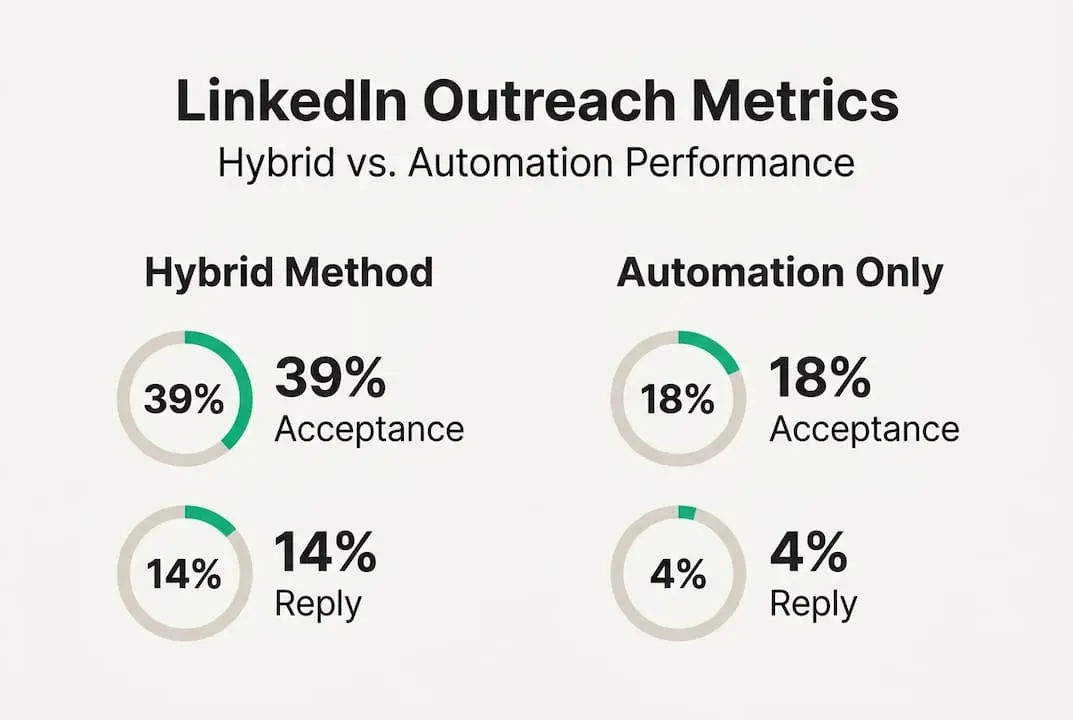
A hybrid outreach approach also frees up time for 90-second deep research per high-value contact, which compounds into significantly better campaign ROI over time. That time investment per contact is what separates reps with a 15% reply rate from those stuck at 5%.
Review your numbers weekly. Watch for early ban warnings like sudden drops in message delivery or connection acceptance. Adjust your messaging, your daily send limits, and your warm-up cadence based on what the data tells you. Tracking outreach metrics with Sales Navigator gives you a real-time view of what is working across your entire pipeline.
Fast signals you are on the right track include more warm replies that reference your opening message, higher engagement on your LinkedIn content from target accounts, and prospects reaching out to you first after seeing your comments.
A smarter philosophy for LinkedIn outreach in 2026
Here is the uncomfortable truth that most outreach guides won’t say out loud: full automation is a trap. It promises speed and delivers bans, low reply rates, and damaged reputation. The sales reps who consistently outperform their peers are not the ones with the fanciest automation stack. They are the ones who treat every touchpoint as a real conversation.
Technology should amplify your effort, not replace your judgment. Sales pros who mix manual touch with smart tooling consistently outperform those who automate everything. The highest-performing reps use AI to surface insights and draft frameworks, then apply their own voice and research before hitting send.
“Technology is a force multiplier, not a crutch.”
Sustainable outreach is built on three things: genuine curiosity about your prospects, authentic conversations that reflect real research, and careful scaling that never sacrifices quality for volume. If every target feels genuinely chosen rather than mass-selected, you will beat competitors who act like bots every single time. That is not a soft skill. It is a competitive advantage.
Boost your LinkedIn outreach with the right tools and pricing
Now that you know what works, here is where to find the top-value tools to amplify results.
The biggest barrier most small business owners and solo reps face is the cost of Sales Navigator. At full retail pricing, it adds up fast, especially for teams managing multiple seats.
Sales Navigator deals through salesnavsplit.com give you access to official, verified LinkedIn Sales Navigator seats at around 50% off standard pricing. Seats are activated within two business hours European time, billing runs through Stripe, and every license is sourced through verified reseller partnerships in the US and Europe. No credential sharing, no gray-market risk, just genuine access at a price that makes sense for growing teams. Check current availability and lock in your seat today.
Frequently asked questions
What is the safest way to do LinkedIn outreach in 2026?
Combine manual personalization with light AI support and avoid heavy automation. Hybrid manual/AI outreach is significantly safer than automation alone, which carries a 23% ban risk within 90 days.
Does LinkedIn Sales Navigator justify its cost for small businesses?
Sales Navigator’s advanced filters for scale deliver strong ROI when paired with a hybrid outreach approach. Start with the free version, then upgrade as your pipeline and outreach volume grow.
How do I avoid LinkedIn bans and automation flags?
Limit daily connection sends, rotate your templates every 10 to 15 messages, engage with target content before messaging, and rely on manual or hybrid touchpoints rather than full automation.
What metrics should I track for outreach performance?
Monitor your acceptance rate, reply rate, meetings booked, and overall ROI. Review these weekly and adjust your messaging, targeting, and timing based on what the data shows.
How much time should I spend on high-value LinkedIn prospects?
Allocate 5 to 10 minutes per Tier 1 target for research and personalized messaging. Dedicated research per contact consistently improves conversion rates compared to template-only approaches.