
Sales Navigator cost breakdown: get more value in 2026
Sales Navigator cost breakdown: get more value in 2026
TL;DR:
- Total costs include subscription fees, training, integrations, and labor, not just the price tag.
- Fully utilizing Sales Navigator features and workflows significantly improves ROI and win rates.
- Discounted and split-seat arrangements offer cost savings while maintaining compliance and feature access.
Most sales professionals look at LinkedIn Sales Navigator and see one number: the monthly or annual subscription fee. That single figure rarely tells the whole story. The real cost of using Sales Navigator includes labor, training, integrations, and whether your team actually uses the features they’re paying for. Sales Navigator cost analysis reveals that smart buyers who understand every component of total spend consistently find ways to cut expenses without sacrificing results. This guide breaks down every cost layer, shows you real numbers across team sizes, and gives you concrete strategies to stretch your budget further.
Table of Contents
- What goes into Sales Navigator costs?
- Sales Navigator pricing tiers and typical expenses
- Hidden and indirect costs: what most miss
- Ways to cut total cost and boost value
- Why true value depends on more than just price
- Save on official Sales Navigator seats
- Frequently asked questions
Key Takeaways
| Point | Details |
|---|---|
| Multiple cost layers | The true price includes subscription, labor, training, and possible addon expenses. |
| ROI is critical | Teams using all features see real performance gains, making the spend worthwhile. |
| Discounts and sharing | Group licenses or split seats can make the tool far more affordable than solo purchasing. |
| Optimize usage, not just fees | Getting the most value from Sales Navigator hinges on consistent, deep use—not just hunting for the lowest sticker price. |
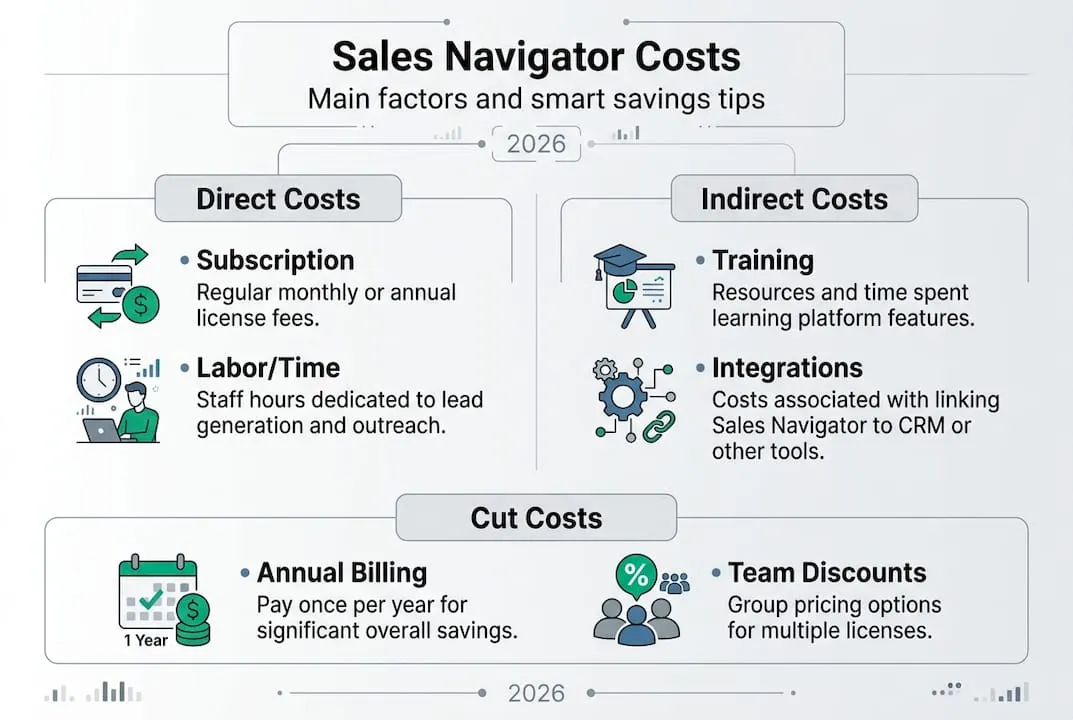
What goes into Sales Navigator costs?
Before exploring detailed pricing, it’s vital to know what actually drives costs. Most people assume the subscription fee is the whole picture. It isn’t.
Subscription tiers are the starting point. LinkedIn offers three plans:
- Core: Basic prospecting, lead lists, and InMail credits
- Advanced: Adds TeamLink, smart links, and usage reporting
- Advanced Plus: Full CRM sync, advanced integrations, and enterprise features
Each tier costs more per seat, and the gap between Core and Advanced Plus is significant. Billing annually versus monthly also changes the math, with annual plans typically saving around 20% compared to month-to-month.
Seat licensing is where costs multiply fast. A solo rep pays one rate. A team of five pays five times that, unless you qualify for volume discounts. LinkedIn does offer group pricing, but it’s not always advertised clearly, and smaller teams often miss it.
| Cost component | Solo user | 3-person team | 10-person team |
|---|---|---|---|
| Subscription fee | Fixed per seat | Scales linearly | Volume discount possible |
| Training time | Low | Medium | High |
| Integration setup | Optional | Often needed | Usually required |
| CRM add-ons | Rare | Common | Standard |
Labor and time are the costs that catch most teams off guard. Manually building lead lists, researching accounts, and managing outreach sequences takes hours every week. As The CRO Report notes, Sales Navigator is powerful but carries a high labor tax if used manually, much like owning a Ferrari you only drive in first gear.
Common additional expenses include third-party training courses, CRM connectors, and workflow automation tools that plug into Sales Navigator.
Pro Tip: Track how many hours per week your team spends on manual prospecting inside Sales Navigator. Multiply that by your average hourly labor cost. You may find labor is your biggest line item, not the software itself.
Sales Navigator pricing tiers and typical expenses
Now that you know what goes into total cost, let’s see real numbers.
As of 2026, LinkedIn’s published pricing for Sales Navigator Core runs approximately $99 per seat per month when billed monthly, or around $79.99 per seat per month on an annual plan. Advanced and Advanced Plus plans carry higher rates, with Advanced Plus often requiring a custom quote for enterprise teams.
| Plan | Monthly billing | Annual billing | Key features |
|---|---|---|---|
| Core | ~$99/seat | ~$80/seat | Lead lists, InMail, alerts |
| Advanced | ~$149/seat | ~$119/seat | TeamLink, smart links, reporting |
| Advanced Plus | Custom | Custom | CRM sync, full integrations |
Here’s what real-world spend looks like across team sizes:
- Solo user on Core (annual): Roughly $960 per year. Manageable for a high-volume rep who uses the tool daily.
- 3-person team on Core (annual): Approximately $2,880 per year before any discounts. Training and onboarding add another $300 to $600 depending on your approach.
- 10-seat team on Advanced (annual): Upward of $14,000 per year. At this scale, volume discounts and typical Sales Navigator expense comparisons become critical budget decisions.
Teams that use Sales Navigator to its full capacity see 17% higher win rates compared to those who rely on basic prospecting methods. That performance gap is the real argument for investing in the right plan.
The per-seat pricing model means every person added to the license increases your annual bill by a fixed amount. For growing teams, this creates a tipping point where shared or split-seat arrangements start making serious financial sense.

Hidden and indirect costs: what most miss
Looking beyond sticker price reveals more ways costs can add up, or be lowered.
The biggest hidden cost is time. Sales Navigator automates parts of prospecting, but it still requires hands-on work. Reps who manually search, filter, and tag leads without using saved searches or alerts are spending hours on tasks the tool could handle in minutes. That inefficiency has a real dollar value.
Training costs are easy to underestimate. A new rep joining a team needs time to learn the platform before they become productive. Formal LinkedIn training programs, third-party courses, or internal onboarding all carry a price, whether in direct fees or in lost productivity during the learning curve.
CRM integrations are another common surprise. Sales Navigator connects natively with Salesforce and HubSpot on higher-tier plans, but smaller teams on Core may need paid third-party connectors to sync data. Those connectors can add $20 to $100 per month depending on the tool.
- Underusing features like TeamLink or smart links raises your effective cost per lead
- Skipping saved searches means reps rebuild the same filters repeatedly
- Ignoring lead alerts causes missed timing on outreach, lowering conversion rates
- Poor CRM sync leads to duplicate data entry, wasting more time
As The CRO Report highlights, treating Sales Navigator like a manual directory rather than an automated prospecting engine is the equivalent of paying for a high-performance tool and using only its most basic functions.
Pro Tip: Calculate your “cost per usable lead” by dividing your total monthly Sales Navigator spend (subscription plus labor hours) by the number of qualified leads your team actually works. If that number is high, the problem is usually underutilization, not the tool itself.
Sales Navigator ROI factors depend heavily on how systematically your team uses every feature available to them.
Ways to cut total cost and boost value
With a clear picture of all costs, here’s how to keep your spend lean while maximizing value.
| Option | Estimated cost per seat/month | Notes |
|---|---|---|
| Standard solo (monthly) | ~$99 | Highest per-seat rate |
| Standard solo (annual) | ~$80 | 20% savings over monthly |
| Official team license | Negotiable | Volume discounts available |
| Split-seat arrangement | ~$40 to $50 | Verified reseller options |
The most immediate saving for most teams is switching from monthly to annual billing. That single change can save roughly $230 per seat per year on Core plans.
Negotiating at renewal is underused and surprisingly effective. LinkedIn account managers have flexibility, especially for teams renewing multi-seat contracts. Come prepared with competitor pricing and a clear usage history.
For split-seat discount options, verified reseller programs can provide official seats at around half the standard rate. These are legitimate, compliant arrangements, not workarounds.
- Automate lead list refreshes using saved searches and alerts instead of manual daily searches
- Use smart links to track prospect engagement and prioritize follow-up
- Focus InMail credits on high-fit accounts rather than broad outreach
- Train your team on at least three core features before expanding usage
For teams with low outreach volume, alternatives and DIY tools can be cheaper and more practical than a full Sales Navigator subscription. The tool earns its price when you use it consistently and at scale.
Pro Tip: Teams that fully use Sales Navigator’s automation and filtering features are the ones capturing that 17% win rate advantage. Partial use delivers partial results at full price.
Why true value depends on more than just price
Here’s an honest take that most cost guides skip: obsessing over the lowest possible fee is often the wrong goal.
We’ve seen teams secure deeply discounted seats and then leave half the features untouched. The savings on paper evaporate when you factor in the hours spent on manual prospecting that the tool could have automated. Cheap access to a powerful tool is only valuable if the team actually uses deep feature usage to its potential.
Manual and DIY methods feel like savings until you price out the labor. A rep spending five extra hours per week on manual prospecting, at even a modest hourly rate, quickly offsets any subscription discount.
The firms that genuinely reduce their cost per win are the ones that treat Sales Navigator as a system, not a directory. They train their teams, build repeatable workflows, and measure output in qualified leads and closed deals, not just in monthly invoices.
Your cost per win is the number that actually matters. Teams using Sales Navigator fully report 17% higher win rates, and that improvement changes the entire ROI calculation. A $960 annual subscription that helps close one additional deal worth $10,000 is not an expense. It’s leverage.
Save on official Sales Navigator seats
If you’ve been paying full retail price for Sales Navigator seats, there’s a straightforward way to change that.
At salesnavsplit.com, we provide access to discounted Sales Navigator seats at roughly 50% off standard LinkedIn pricing. These are official, verified licenses sourced through authorized reseller partnerships in the US and Europe. Seats activate within 24 to 48 hours, payments process securely through Stripe, and every license is fully compliant with LinkedIn’s terms of service. Whether you’re a solo rep or building out a small team, this is the most direct way to apply the cost-saving strategies covered in this guide without sacrificing access to any features.
Frequently asked questions
What is the cheapest way to access Sales Navigator?
The cheapest legitimate route is through split-seat arrangements or official group license discounts, rather than solo monthly subscriptions. For very low-volume users, DIY tools may cost less overall.
Are there any hidden fees with Sales Navigator?
Yes. Beyond the subscription, costs can include training time, CRM integration add-ons, and the labor hours your team spends on manual tasks the tool could automate. High labor tax from manual use is the most common hidden cost.
Does using Sales Navigator actually increase sales?
Industry benchmarks show that teams using Sales Navigator fully achieve 17% higher win rates compared to standard prospecting methods, making full utilization the strongest ROI driver.
Can I share Sales Navigator seats legally?
Informal credential sharing violates LinkedIn’s terms of service. Legal seat sharing happens only through official team license programs or verified reseller arrangements that comply with LinkedIn’s policies.